EVSE - Charging Write
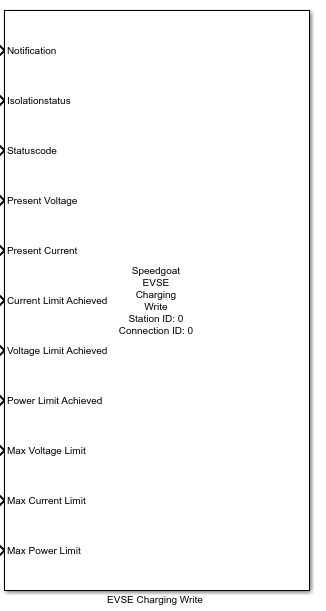
EVSE - Charging Write — Writes data to the EVSE
board during the Charging state of the charge cycle.
Library
Simulink Real-Time - Speedgoat
Description
The EVSE Charging Write block writes data to the EVSE charging board during the
Charging state of the charge cycle.
Ports
Inputs
-
Notification
Enumerated notification following enumeration table
"EVSENotificationType" of ISO 15118-2.
0: None
1: Stop charging
2: Renegotiation
-
Isolationstatus
Set the chargers isolation status following enumeration table
"isolationLevelType" of ISO 15118-2.
-
Statuscode
Set the chargers status following enumeration table
"DC_EVSEStatusCodeType" of ISO 15118-2.
-
Present Voltage
Set the charger's present voltage communicated to the EV.
-
Present Current
Set the charger's present current communicated to the EV.
-
Current Limit Achieved
Set a flag indicating that the charger has reached its maximum current
limit.
-
Voltage Limit Achieved
Set a flag indicating that the charger has reached its maximum voltage
limit.
-
Power Limit Achieved
Set a flag indicating that the charger has reached its maximum power
limit.
-
Max Voltage Limit
The maximum voltage limit of the EVSE in volts.
-
Max Current Limit
The maximum current limit of the EVSE in amperes.
-
Max Power Limit
The maximum power limit of the EVSE in watts.
Parameters
Main Tab
-
Station ID
Defines the Station ID of the corresponding Setup block. Must range
between 0 and 65535.
-
Connection ID
Defines the Connection ID of the corresponding Setup block. Must range
between 0 and 65535.
-
Sample Time
Defines the base sample time at which this driver block gets its
sample hit. This parameter can also be set to -1 for inherited sample time. The units are in
seconds.
Enable/Disable Signals Tab
Some settings, like min. and max. voltage limits, are already set by the Setup
block but can be overwritten during the Parameter Discovery state of the charge
if desired. However, unused signals that remain unconnected are set to zero. To
avoid setting parameters to zero, unused signals should be unchecked here to
disable the write operation.
The following signals can be disabled:
Max Voltage Limit
Max Current Limit
Max Power Limit