IO602/IO603/IO691 - CAN Status
IO602/IO603/IO691 - CAN Status — This block provides CAN or CAN-FD
bus and controller status information for the configured channel of the IO602,
IO603, or IO691 I/O module
Library
Simulink Real-Time - Speedgoat
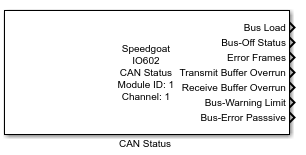
Description
This CAN Status driver block is part of the generic block library for the IO602,
IO603, and IO691 I/O modules.
This block provides CAN bus and controller status information for the configured
channel. An optional input port makes it possible to disable this channel.
Ports
Inputs
-
Disable CAN Channel
This input port is available whenever the Show
Input Port to Disable the CAN Channel checkbox in the
block mask is selected. Use this port to check whether the channel is
enabled to interact on the bus or not.
Providing a logical "1" to this input signal stops the CAN channel
from interacting on the bus. This channel will stop transmission and
reception of new data with the next sample step. The transmit and
receive buffer will be flushed.
This functionality can be used to simulate a channel disconnecting
from the bus. Among other things, this means that the channel stops
setting ACK bits. However, all the status indicators or counter values
will remain until the channel is enabled again.
The channel will always start in an enabled state.
Outputs
This block comes with several outputs by default. Enabling the expert mode
will provide further outputs in addition to the default ones. Refer to the
Enable Expert Mode parameter below for
additional information.
-
Bus Load
CAN bus load in percentage as cyclically reported by the hardware
every 500 ms. When starting a new transmission there will be a
timeout of up to two cycles (1 s) to collect sufficient data until the
busload is reported correctly. This will happen on startup or generally
when a channel is being disconnected from or connected to the
bus.
When the bus is overloaded or a cable is disconnected the signal may
fluctuate between 0% and 100%.
-
Bus-Off Status
Indicates if the CAN controller is in bus off mode as described within
the CAN specification. This is set if the associated CAN Transmit Error Counter reaches the bus off
limit of 255 errors.
This state will be automatically recovered by the controller as soon
as it is detected.
-
Error Frames
Number of error frames received since simulation start. This counter
will only reset on a model restart.
-
Transmit Buffer Overrun
Indicates an overrun on the transmit buffer of this channel. This
shows if there was a potential data loss in the output signal flow. The
buffer may overflow if the traffic on the CAN Write block is too large
for the configured sample rate. The size of this buffer is 16383
messages.
-
Receive Buffer Overrun
Indicates an overrun on the receive buffer of this channel. This shows
if there was a potential data loss in the output signal flow. The buffer
is only used if the CAN Read block is in FIFO mode. It may overflow if
the bus-load is too high or because the receive buffer is not read out
by a CAN Read block using a fast enough sample rate. The size of this
buffer is 16383 messages.
-
Bus-Warning Limit
Indicates if the CAN controller has reached the bus warning limit as
described within the CAN specification. This is set if either the
associated CAN Receive Error Counter or
the CAN Transmit Error Counter reaches
the warning limit of 96 errors.
-
Bus-Error Passive
Indicates if the CAN controller is in error passive mode as described
within the CAN specification. This is set if either the associated CAN
Receive Error Counter or the CAN
Transmit Error Counter reaches the
passive limit of 127 errors.
-
Timestamp
Outputs the timestamp of when the status data was retrieved on the bus
in seconds (s) in relation to the model start.
-
Aborted Frames
Number of aborted transmission frames since simulation start. This
counter will only reset at model restart. A transmitting frame will be
aborted if the default timeout of 1 ms is exceeded while the frame is in
the transmit buffer.
-
Receive Error Counter
Number of receive errors currently on this channel since simulation
start. This counter is increased by 1 if an error is detected during
reception. If no other CAN node detected this error, the counter is
increased by 8. Each successful reception decreases this counter by 1.
-
Transmit Error Counter
Number of transmit errors currently on this channel since simulation
start. This counter is increased by 8 if an error is detected during
transmission of this channel. Each successful transmission decreases
this counter by 1.
-
Bit Count
Number of bits on the CAN bus since simulation start. This counter
will only reset on a model restart.
Parameters
-
Module ID
This ID defines the link to the corresponding Setup block
- Channel Number
Selects the CAN channel with which this driver block communicates.
- Enable Expert Mode
If this is enabled, the following output ports are available in
addition to the default ones:
Timestamp
Aborted Frames
Receive Error Counter
Transmit Error Counter
Bit Count
-
Show Input Port to Disable the CAN Channel
Enables an input port that can be used to disable the associated
channel.
-
Sample Time
Defines the base sample time at which this driver block gets its sample hit. This
parameter can also be set to -1 for inherited
sample time. The units are in seconds.