IO602/IO603/IO691 - CAN Read
IO602/IO603/IO691 - CAN Read — Reads CAN (HS) and CAN-FD messages
from one channel
Library
Simulink Real-Time - Speedgoat
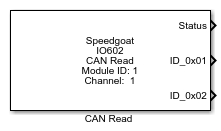
Description
The CAN Read block reads messages from one channel of the selected I/O module's
input queue. Multiple instances of the block can be used to receive messages at
multiple rates or in multiple places of the Simulink model.
Refer to the usage notes to learn how this
block can be used for the different read modes: "Single Read from Buffer (FIFO)" and
"Specify by IDs".
Ports
Which outputs are available depends on the Channel
Selection setting of the corresponding I/O module Setup block and the
Message Type setting of the respective block:
CAN (HS) : The message type available is CAN_MESSAGE and
CAN_MESSAGE_BUS output. For further information about the
CAN_MESSAGE_BUS data type, refer to the usage
notes.
CAN-FD : The only message type available is CAN_FD_MESSAGE_BUS
output
Outputs
-
Data present
If Single Read from Buffer (FIFO) is
selected in the Read Mode parameter,
the Data present signal is "1" if new data is available and "0"
otherwise. The data type is boolean.
-
Status
If Specify by IDs is selected in the
Read Mode parameter, the Status
signal is "1" if new valid data has been read during one time step and
"0" otherwise. In the latter case, the last valid data read is always
output. The data type is an array of booleans equal to the size of the
specified Message IDs.
-
CAN Msg
The CAN message received. Please use the "CAN Unpack" or "CAN-FD
Unpack" block to resolve the data, depending on which setting applies to
the channel.
The data type is CAN_MESSAGE or CAN_MESSAGE_BUS if CAN (HS) is
selected.
The data type is CAN_FD_MESSAGE_BUS if CAN-FD is selected.
-
CAN Msg [ID]
If Output port per ID is selected in
the parameter setting, an output port for each Message ID specified in
the Message ID List is created on the
Read block.
Input
-
Enable Input
This input port is available whenever the Show
Enable Input checkbox in the block mask is activated. Use
this port to control whether the block should execute or not.
Parameters
-
Module ID
This ID defines the link to the corresponding Setup block
-
Channel Number
Select the CAN channel to which this CAN read block
corresponds.
-
Message Type
Defines how the CAN message is represented at the block outputs. This
parameter also depends on the Channel
setting of the related CAN Setup block.
CAN with CAN (HS): Only one CAN Msg output
port is available. The port will always be connected to one or
more CAN Unpack blocks
CAN with CAN-FD: Only one CAN Msg output port is available.
The port will always be connected to one or more CAN-FD Unpack
blocks
-
Output as Bus
Select this option for the block to output CAN messages as a bus
signal.
-
Read Mode
Defines the working mode of the block.
Single Read from Buffer
(FIFO)
At every block execution, one message is
read from the RX FIFO and made available on the CAN Msg port.
When this mode is used, the Status port outputs how many
messages are still available in the block RX FIFO.
Each Read block has a 2,047-message deep software FIFO buffer
in which Rx messages are queued.
Specify by
IDs
When selecting this mode, the block receives
the last message for each ID specified in the Message ID List parameter. The
messages received are output on the corresponding output port
(labeled according to the ID). When this mode is used, the
Status port outputs an array with the same length of the
Message ID List. The value
is set to 1 if a new message has been received for the
corresponding ID and to 0 if the message has not been
updated.
-
Message ID List
If the read mode is set to Specify by
IDs, the Message ID List
indicates which Messages are read with this specific CAN read block.
Refer to the usage notes for
more information on Message ID handling.
-
Extended Frames
When selecting this option, the block will receive messages with the
29-bit extended frame format, otherwise it will receive standard 11-bit
frames. This setting applies only when read mode is set to Specify by IDs.
-
Label in hex
When read mode is set to Specify by
IDs, the label of each output port can be configured to
display the corresponding ID in decimal or hexadecimal format. The
setting applies to all message
ports.
-
Show Enable Input
Select this option for the Enable Input Port to be available. With
this port, the block execution can be controlled through an
input.
-
Sample Time
Defines the base sample time at which this driver block gets its sample hit. This
parameter can also be set to -1 for inherited
sample time. The units are in seconds.