IO61X - CAN Write
IO61X - CAN Write — Sends CAN (HS) and CAN-FD
messages to one channel
Library
Simulink Real-Time - Speedgoat
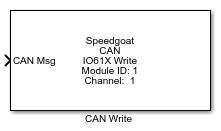
Description
The CAN Write block executes according to the settings in the corresponding CAN
Setup block. The execution primarily depends on whether the operation mode is set to
CAN (HS) or CAN-FD.
Each execution of a CAN Write block consists of a CAN message being written to the
output buffer of the corresponding I/O module. Multiple instances of the block can
be used to send messages at multiple rates.
Each Write block has a software FIFO buffer in which TX messages are queued. When
selecting the sample time of the Write block, the user must ensure that all messages
can be transmitted within a single sample step and that the bus is not
overloaded.
Ports
Outputs
-
Transmit Buffer Overrun
This output port is available whenever the
Overrun Output checkbox in the block mask is activated.
When the output signal is "1", the approach to push the current data to
the transmission buffer was unsuccessfull. If the output signal is "0",
the data was pushed successfully.
Inputs
The availability of input ports depends on the Channel
Operation Mode Selection setting of the corresponding CAN Setup
block and the Message Type setting of the
respective block:
CAN (HS): The message type available is CAN_MESSAGE and
CAN_MESSAGE_BUS input. For further information about the
CAN_MESSAGE_BUS data type, refer to the usage
notes.
CAN-FD & CAN: The only message type available is
CAN_FD_MESSAGE_BUS input.
-
CAN Msg
The CAN message to transmit. Use the "CAN Pack" or
"CAN-FD Pack" block to create this message.
The data type is CAN_MESSAGE or CAN_MESSAGE_BUS if CAN (HS) is
selected.
The data type is CAN_FD_MESSAGE_BUS if CAN-FD is selected.
-
Tx Control
This input port is available whenever the Show
Transmission Control Input checkbox in the block mask is
activated. Use this port to control which messages are to be transmitted
during execution. Each message may be controlled individually using an
n-element uint32 vector, where n represents the Number of Messages. The indexing of the messages aligns
with the order in which the packed CAN messages are supplied to the
CAN Msg port.
Using the values within the uint32 vector, various options to manage
the transmission of each individual CAN message can be controlled:
'0' to temporarily disable the CAN message
'1' to enable the CAN message and transmit it at every
sample step of the block
Value d (>'1') to enable the CAN message, but only send it
at every d sample step of the block (e.g., d = '4' sends
this message at every 4th sample step of the block)
Parameters
-
Module ID
This ID defines the link to the corresponding Setup block
-
Channel Number
Selects the CAN channel to which this driver block corresponds.
-
Message Type
This field is configured by the corresponding Setup block, and is
therefore not enabled in the block mask.
Use either a "CAN Pack" or "CAN-FD Pack" block to create a CAN or
CAN-FD message, depending on the setting of the corresponding CAN Setup
block.
-
Input as Bus
Select this option for the block if the input CAN message is a bus
signal. If the block is configured for CAN-FD protocol, this option is
enabled by default and cannot be changed by the user.
-
Number of Messages
Indicate the number of messages that are sent through this CAN Write
block.
-
Show Transmission Control Input
Select this option for the Tx Control Input Port to be available. With
this port, the message transmission can be controlled through an
input.
-
Overrun Output
Select this option for the Transmit Buffer Overrun output port to be
available.
-
Sample Time
Defines the base sample time at which this driver block gets its sample hit. This
parameter can also be set to -1 for inherited
sample time. The units are in seconds.