IO672 - Select BM Message
IO672 - Select BM Message — Select message from a
Bus Monitor list
Library
Simulink Real-Time - Speedgoat
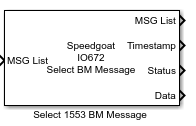
Description
This block picks a message with specified properties out of a Bus Monitor list
from the Bus Monitor block.
Ports
Inputs
- MSG List
BC Message List from the Bus Monitor block.
Outputs
-
MSG List
The passed through BM Message List
-
Timestamp
Time in microseconds at which this message was received
-
Status
Status (seven component vector with contents)
Elements cmd1 and cmd2 contain address information in bit
fields in the 16-bit integer.
cmdN=<RRRRR>T<SSSSS><CCCCC> Where RRRRR is the 5-bit
field with the remote terminal address. T is 1 if a transmit message, 0
if receive. S is the sub address and C is the count.
Elements rsp1 and rsp2 contain the response time from the remote
terminal (Time delay between BC data or command word and the received
status word form RT).
Elements status1 and status2 contain the status word provided by the
remote terminal in response to the BC message.
![[Note]](images/note.png) | Note |
|---|
Elements 5, 6, and 7 are only nonzero for the RT->RT
messages. |
-
Data
32 element (uint16) vector data. cmd 1 has the
length of real data in the low order 5 bits.
The block clears the status and data words to 0 if a matching message is not found
in the list.
Parameters
-
Message selection mode
The message selection (filtering) mode:
message number — By
message number
BC->RT or RT->BC — By Remote Terminal
and sub address
RT->RT — By both
Remote Terminal and sub addresses
-
Message number
An index into a Bus Monitor list. Use this parameter if you set
Message selection mode to message number.
-
Remote Terminal address 1 (Receive if RT-RT)
The Remote Terminal from which to select the message. Use this
parameter if you set Message selection mode
to one of the following:
BC->RT or RT->BC
RT->RT (receive
side)
-
Sub address 1 (Receive if RT-RT)
The sub address from which to select the message Use this parameter if
you set Message selection mode to one
of the following:
BC->RT or RT->BC
RT->RT (receive
side)
-
Remote Terminal address 2 (Transmit if RT-RT)
The Remote Terminal from which to select the message. Use this
parameter if you set Message selection
mode to RT->RT (send
side).
-
Sub address 2 (Transmit if RT-RT)
The sub address from which to select the message. Use this parameter
if you set Message selection mode to
RT->RT (send side).
-
Direction
The encode direction. Use this parameter if you set Message selection mode to BC->RT or RT->BC. Choose from:
-
Sample Time
Defines the base sample time at which this driver block gets its sample hit. This
parameter can also be set to -1 for inherited
sample time. The units are in seconds.