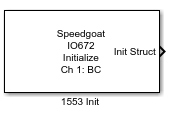
IO672 - Initialize
IO672 - Initialize — Initializes the IO672 I/O
Module
Library
Simulink Real-Time - Speedgoat
Description
Use one block per channel to initialize it.
Ports
Outputs
- Init Struct
Vector that contains information for RT Initialize block.
Parameters
-
Channel
From the list of available channels on the board, choose channel 1, 2,
3, or 4. This channel is initialized for this command stream.
-
Coupling mode
Defines the mode for coupling a terminal device to the bus.
-
Initialize for Bus Controller operation
When selected, Bus Controller initialization is performed for this
channel. Selecting this check box enables the parameters:
Number of Bus Controller buffers to
allocate
Enable retries
No response timeout
(microseconds)
Late response timeout
(microseconds)
-
Number of Bus Controller buffers to allocate
The number of message buffers to allocate in onboard memory on the
board. This number must be greater than or equal to the longest string
of command buffers that the board is given to process.
-
Enable retries
When selected, automatic retries are enabled when a message times out
or has an error.
-
No response timeout (microseconds)
The number of microseconds the board is to wait for a response from
the Remote Terminal. If the response from the Remote Terminal takes
longer than this timeout value, the board sets the NORESPONSE error
condition in the status returned from the command.
-
Late response timeout (microseconds)
The number of microseconds the board waits for a response from the
Remote Terminal. If the response from the Remote Terminal takes longer
than this timeout value, the board sets the LATERESPONSE error condition
in the status returned from the command.
-
Initialize for Bus Monitor operation
When selected, this channel is initialized for Bus Monitor operation.
Selecting this check box enables the parameters Monitor bus A, Monitor bus
B, and Number of monitor buffers to
allocate.
-
Monitor bus A
When selected, bus A is monitored. You can monitor either bus A, bus
B, or both.
-
Monitor bus B
When selected, bus B is monitored. You can monitor either bus A, bus
B, or both.
-
Number of monitor buffers to allocate
Enter a number at least as large as the number of messages that you
expect to see between calls to the Bus Monitor block. If more messages
arrive than there are buffers, some messages are lost and not monitored.
-
Initialize for Remote Terminal operation
When selected, the board is initialized to operate as a Remote
Terminal. If this check box is selected, add the RT Initialize block to
the model to initialize the Remote Terminal. Connect the RT Initialize
block for the Remote Terminal to the S output of this block. Selecting
this check box enables the parameter RT address 31
is Broadcast.
-
RT address 31 is Broadcast
Select this check box to enable the board to see messages to Remote
Terminal 31 as broadcast messages.
-
Sample Time
Defines the base sample time at which this driver block gets its sample hit. This
parameter can also be set to -1 for inherited
sample time. The units are in seconds.