IO682 - Send v4
IO682 - Send v4 —
Transmits ARINC 429 messages
Library
Simulink® Real-Time™ - Speedgoat
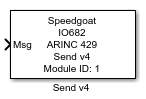
Description
This block allows ARINC 429 messages to be transmitted and can be placed in your
model as many times as required.
Ports
Inputs
-
Msg
ARINC 429 messages to send.
-
Tx Ctrl
This input port is available whenever the Show
Transmission Control Input checkbox in the block mask is
activated. Use this port to control which messages are to be transmitted
during execution. Each ARINC 429 message may be controlled individually
using an n-element uint32 vector, where n represents the Number of Messages. The indexing of the
messages aligns with the order in which the messages are supplied to the
Msg port.
Using the values within the uint32 vector, various options to manage
the transmission of each individual message can be controlled:
'0' to temporarily disable the message
'1' to enable the message and transmit it at every sample step
of the block
Value d (>'1') to enable the message, but only send it at
every d sample step of the block (e.g., d = '4' sends this
message at every 4th sample step of the block)
Parameters
The configuration details are all defined in the setup block.
-
Module ID
This ID defines the link to the corresponding Setup block
-
Channel
Defines from which channel the message will be sent.
-
Sample Time
Defines the base sample time at which this driver block gets its sample hit. This
parameter can also be set to -1 for inherited
sample time. The units are in seconds.
-
Show Transmission Control Input
Select this option for the Tx Control Input Port to be available. With
this port, the message transmission can be controlled through an
input.