ARINC429 - Unpack
ARINC429 - Unpack —
Unpacks ARINC 429 words from the Receive block
Library
Simulink® Real-Time™ - Speedgoat
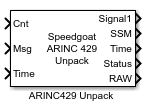
Description
This block unpacks the ARINC 429 word in signals, depending on the specified
configuration.
Ports
Inputs
-
Cnt
The number of messages to process. The decode block reads data from
the input message vector until the n-th element.
-
Msg
ARINC 429-encoded messages.
-
Time
Timestamps from the ARINC 429-encoded messages.
Outputs
-
Signal
The signals are decoded according to the values configured in the
signal table.
If the same ARINC 429 word is decoded multiple times during one sample
time, the Unpack block overwrites these values. Consequently, only the
most recent decoded value is available on the output port.
-
Time
The timestamp of the decoded data value.
If the same ARINC 429 word is decoded multiple times during one sample
time, the Unpack block overwrites these values. Consequently, only the
most recent decoded value is available on the output port.
-
Status
The status output shows if the specified label was received during the
current sample time.
-
RAW
Outputs the raw ARINC429 word which matches the specified Label and SDI values.
Parameters
-
Label
Enter a three-digit octal number. If the label of an input word does
not match this label, the Unpack block completely ignores the ARINC 429 word.
![[Note]](images/note.png) | Note |
|---|
The Label bit order is
automatically reversed by the receive logic after receipt of the
ARINC 429 word. |
-
SDI
If the SDI element is in the range
0 to 3, the block checks the
SDI field of the corresponding output word. If an SDI element has a
value of -1, the block does not perform SDI
processing on the corresponding output word. If the SDI data does not
match the specified value, the ARINC 429 word is ignored.
-
Signals
Use the Add Signal button to create a
new signal entry in the signal table. With the Delete Signal button, the selected signal can be removed
from the table. Each signal that you create has the following values:
Name: Specify a descriptive name for your signal, which is
then displayed on the block
Start Bit: Specify the start bit of the data. The start
bit must be an integer from 9 to 31
| Note |
|---|
Bits 1 to 8 are reserved for the ARINC 429
Label and bit 32
for the parity bit of the ARINC 429 word |
Length: Specify the number of bits the signal occupies in
the ARINC 429 word. Ensure that the specified signals do not
overlap
Data Type: Select between BNR, BCD, DSC, or SSM data encoding
| Note |
|---|
If no SSM signal is defined, the default value
from the SSM
parameter is used |
Resolution: Specify the value per bit to apply to convert
the physical value to the raw value packed in the ARINC 429
word
Offset: Specify the value to apply to convert the physical
value to the raw value packed in the ARINC 429 word
Min: Specify the minimum value of the input signal before
clipping occurs. Use -Inf if you do not want to limit the
signal
Max: Specify the maximum value of the input signal before
clipping occurs. Use Inf if you do not want to limit the
signal
Signed: Select this option if the BNR signal is packed as
a signed or unsigned integer
| Note |
|---|
If you have a signed signal, one bit of the signal
length is used for the sign bit |
-
Enable Timestamp Output
Select if timestamps should be provided for each decoded ARINC 429
word.
-
Enable Status Output
Select if the status should be provided for the specified label.
-
Enable RAW Output
Select if the raw ARINC429 word should be provided for the specified
label.