ARINC429 - Decode v4
ARINC429 - Decode v4 —
Decode ARINC 429 words from the Receive block
Library
Simulink® Real-Time™ - Speedgoat
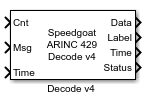
Description
This block decodes the ARINC 429 protocol depending on the data type
selected.
Ports
Inputs
-
Cnt
The number of messages to process. The Decode block reads data from
the input message vector until the n-th element.
-
Msg
ARINC 429-encoded messages.
-
Time
Timestamps from the ARINC 429-encoded messages.
Outputs
-
Data
Vector with n decoded values.
If the same ARINC 429 word is decoded multiple times during one sample
time, the Decode block overwrites these values. Consequently, only the
most recent decoded value is available on the output port.
- Label
A vector containing labels that can be used for post processing to
identify which element in the data output corresponds to which
label.
- SSM
A vector containing the sign/status matrix (SSM) data for each
decoded ARINC429 word.
-
Time
A vector containing the timestamps of each decoded data value.
If the same ARINC 429 word is decoded multiple times during one sample
time, the Decode block overwrites these values. Consequently, only the
most recent decoded value is available on the output port.
-
Status
For every specified label, the status output shows if the label was
received during the current sample time.
Parameters
-
Label
Enter a three-digit octal number or vector. If the label of an input
word does not match this label, the Decode block completely ignores the
ARINC 429 word.
![[Note]](images/note.png) | Note |
|---|
The Label bit order is
reversed automatically by the receive logic after receipt of the
ARINC 429 word. |
-
Data Type
Select the decoding style for the labels defined. The data type
determines how the input value is converted to a corresponding output
value:
-
Resolution (BCD) or Scale (BNR)
Enter a vector or scalar value as the resolution/scale vector. If a
vector is entered, then it must be the same length as the Label; otherwise, the scalar value is applied
to the length of the Label
vector.
The interpretation of this value depends on the data type:
-
SDI
Enter a vector or scalar value as the SDI data. If a vector is entered, then it must be the
same length as the Label; otherwise,
the scalar value is applied to the length of the Label vector.
If the SDI element is in the range 0 to
3, the block checks the SDI field of the
corresponding output word. If an SDI element has a value of
-1, the block does not perform SDI processing on
the corresponding output word. If the SDI data does not match the
specified value, the ARINC 429 word is ignored.
-
Use SDI Bits for Data
Select whether the SDI field should
be used for data (the data field can be extended by two bits).
-
Hold Last Value
Select to output the last received value if no new data is received or
deselect to output 0.
-
Enable Label Output
Select if the specified Label should
be available on the output port.
-
Enable SSM Output
Select if the SSM should be provided for each specified label.
-
Enable Timestamp Output
Select if timestamps should be provided for each decoded ARINC 429
word.
-
Enable Status Output
Select if the status should be provided for each specified label.