ARINC429 - Pack
ARINC429 - Pack —
Pack ARINC 429 words for the Send block
Library
Simulink® Real-Time™ - Speedgoat
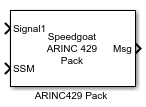
Description
This block packs the input signals into the ARINC 429 word based on the specified
configuration.
Ports
Inputs
-
Signal
All the connected signals are packed into the ARINC 429 word according
to the values configured in the signals table.
Outputs
-
Msg
ARINC 429-encoded messages.
Parameters
-
Label
Enter a three-digit octal number as the ARINC 429 label.
![[Note]](images/note.png) | Note |
|---|
The Label bit order is
reversed automatically by the transmit logic prior to
transmission of the ARINC 429 word for all Data Type options. |
-
SDI
If the SDI element is in the range
0 to 3, the block sets the SDI
field of the corresponding output word to that value. If the SDI element
has a value of -1, the block does not perform SDI
processing on the corresponding output word.
-
SSM
Default value for the sign/status matrix (SSM) field if no signal is defined with the SSM data
type.
If the SSM element is in the range 0 to
3, the block sets the SSM field of the
corresponding output word to that value. If the SSM element has a value
of -1, the block does not perform SSM processing on
the corresponding output word.
-
Signals
Use the Add Signal button to create a
new signal entry in the signal table. With the Delete Signal button, the selected signal can be removed
from the table. Each signal that you create has the following values:
Name: Specify a descriptive name for your signal, which is
then displayed on the block
Start Bit: Specify the start bit of the data. The start
bit must be an integer from 9 to 31
| Note |
|---|
Bits 1 to 8 are reserved for the ARINC 429
Label and bit 32
for the parity bit of the ARINC 429 word |
Length: Specify the number of bits the signal occupies in
the ARINC 429 word. Ensure that the specified signals do not
overlap
Data Type: Select between BNR, BCD, DSC, or SSM data encoding
| Note |
|---|
If no SSM signal is defined, the default value
from the SSM
parameter is used |
Resolution: Specify the value per bit to apply to convert
the physical value to the raw value packed in the ARINC 429
word
Offset: Specify the value to apply to convert the physical
value to the raw value packed in the ARINC 429 word
Min: Specify the minimum value of the input signal before
clipping occurs. Use -Inf if you do not want to limit the
signal
Max: Specify the maximum value of the input signal before
clipping occurs. Use Inf if you do not want to limit the
signal
Signed: Select this option if the BNR signal is packed as
a signed or unsigned integer
| Note |
|---|
If you have a signed signal, one bit of the signal
length is used for the sign bit |