BMTS Bus Pack
BMTS Bus Pack — Configure the BMTS Bus Pack
block
Library
Simulink Real-Time - Speedgoat
Description
![[Note]](images/note.png) | Note |
|---|
This documentation refers to the Speedgoat Battery Management Testing Systems
(BMTS) that are supported with MATLAB R2022a and
later. |
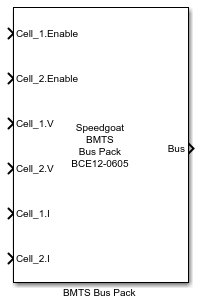
The BMTS Bus Pack block consists of a masked subsystem with a MATLAB App-based
block mask. The subsystem is dynamically populated with a Bus Assignment block and
input ports for the signals selected by the user. The signals are inserted into the
bus signal structure for the selected BMTS device, which can then be used as input
to the BMTS Write block for this device.
Ports
This driver block has a variable number of input ports and one output port.
Inputs
-
Signal Name
For each element of the bus signal that is selected on the Signal Selection tab, an input port is
created. The data type depends on the selected signal.
Outputs
-
Bus
The bus port outputs a Simulink bus signal, the structure of which
depends on the selected device. The Simulink bus object is automatically
created in the MATLAB workspace when selecting a device type. This
signal can be used as input to the BMTS Write block for a BMTS device of
the same type.
Parameters
-
Device Type
Select the desired BMTS device type from the drop-down list of all
possible BMTS devices. The name of the resulting bus signal is displayed
below the drop-down menu.
-
Input Ports Order
Select the desired order of the input ports of the BMTS Bus Pack
block. The two available options are:
By Channels: put all selected signals for Channel 1 at the
top, followed by Channel 2, etc.
By Signal Types: group signals of the same type from all
Channels together