BMTS Read
BMTS Read — Configure the BMTS Read
block
Library
Simulink Real-Time - Speedgoat
Description
![[Note]](images/note.png) | Note |
|---|
This documentation refers to the Speedgoat Battery Management Testing Systems
(BMTS) that are supported with MATLAB R2022a and
later. |
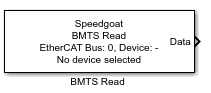
The BMTS Read block consists of a masked subsystem with a MATLAB App-based block
mask. The subsystem is dynamically populated with a set of preconfigured EtherCAT
Receive blocks to receive the data from the selected device. The list of devices is
automatically loaded from the BMTS Setup block with the same EtherCAT Network Index.
Ports
This driver block has one output port.
Outputs
-
Data
The data port outputs a Simulink bus signal, the structure of which
depends on the selected device. The Simulink bus object and a template
structure for initialization are created in the MATLAB workspace after
the block has been configured. It is recommended to use a Bus Selector
block to access the data contained in the bus signal.
Parameters
-
EtherCAT Network Index
The EtherCAT Network Index is a
user-defined ID to associate the BMTS Read block with the corresponding
BMTS Setup block. The value must be an integer between 0 and 11. When
changing the network index, click the Reload
device list button to load the list of devices from the
BMTS Setup block.
-
EtherCAT Device
Selects the device from which the BMTS Read block will receive data.
-
Sample Time
The sample time is displayed here, however, it must be configured in
the corresponding BMTS Setup block. This is because the sample time for
EtherCAT is set globally and written to the ENI (EtherCAT Network
Information) file. Therefore, individual BMTS Read blocks must all use
this globally configured sample time.