IO611 - CAN-FD Write
IO611 - CAN-FD Write — Send CAN-FD message to one
channel of the IO611
Library
Simulink Real-Time - Speedgoat
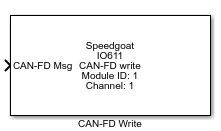
Description
Each execution of a "CAN-FD Write" block represents a CAN-FD message being written
to the IO61X output buffer. Multiple instances of the block can be used in order to
send messages at multiple rates. The buffer size is 96 messages per channel, so
depending on the selected baud rate and the "CAN-FD Write" block sample times, it is
important to not let the output buffer overflow. You may use the block status output
port to verify this.
Ports
Inputs
-
CAN-FD Msg
The complete CAN-FD message. Please use the "CAN-FD Pack" block to
create this message.
-
ID [uint32]
Identifier of the CAN message.
-
EFF [uint32]
Identifier type (Extended Frame Format) of the CAN-FD message.
-
DLC [uint32]
Length of the payload data. The following configurations are possible:
-
BRS [uint32]
Bitrate Shift
-
Data [uint8(64)]
Payload data of the CAN-FD message. Be aware that the size of this
input is always 64 bytes, as the length of the payload data can vary at
runtime.
Outputs
-
Status [uint32]
Indicates if the message supplied to the input ports has been
successfully placed in the module TX queue.
This port can be enabled or disabled from the "Show
status output port" in the dialog box for this driver block.
Parameters
-
Module ID
This ID defines the link to the corresponding Setup block
-
Sample Time
Defines the base sample time at which this driver block gets its sample hit. This
parameter can also be set to -1 for inherited
sample time. The units are in seconds.
-
Send Message with Channel
Choose the CAN-FD channel to which this driver block should be
connected.
-
Message Type
CAN-FD: Use "CAN-FD Pack" block to define the CAN-FD
message.
RAW: Manual definition of the CAN-FD message without the
"CAN-FD Pack" block. Please see the CAN-FD specification for
the correct input values for the Identifier, Identifier
Type, Length, Bitrate Shift and Data.
-
Enable Status Output Port
Adds the "Status" output port.