IO601 - CAN Write v4
IO601 - CAN Write v4 — Send CAN message to the IO601
output buffer
Library
Simulink Real-Time - Speedgoat
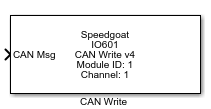
Description
Each execution of a "CAN Write" block represents a CAN message being sent to the
IO601 output buffer. Multiple instances of the block can be used in order to send
messages at multiple rates.
The buffer size is 50 messages per channel. Take precaution when defining the
settings of the baud rate and the "CAN Write" block's sample time to avoid overflows
on the output buffer. Use the block status output port to verify this.
Ports
Which inputs are available depends on the "CAN message datatype" mask
setting.
CAN-MESSAGE: Only CAN message input is available.
RAW-MESSAGE: Data, Identifier, Length and Identifier Type input are
available.
Inputs
-
CAN Msg
The complete CAN message. Please use the "CAN Pack" block to create
it.
Data
Types:CAN_MESSAGE
-
Data
The payload data of the CAN message is 8 bytes.
Data
Types:uint8(8)
-
Identifier
The identifier of the CAN message.
Data
Types:uint32
-
Length
The length of the payload data.
Data
Types:uint32
-
Identifier Type
The identifier type of the CAN message.
Data
Types:uint32
Outputs
-
Status
Indicates if the message supplied to the input ports has been
successfully placed in the IO601 tx queue.
0: The frame content is valid and the message was
successfully transmitted to the IO601.
-1: The frame content is valid, but the message could not
be delivered to the IO601 because no queue entry was
available.
-11: The Identifier type input is neither "0" (standard)
nor "1" (extended).
-12: The Identifier input value is out of range for the
standard type: maximum is 2047 (0x1FF).
-13: The Identifier input value is out of range for the
extended type: maximum is 536870911 (0x1FFF'FFFF).
-14: The Length input value is out of range for the
extended type: maximum is 8.
This port can be enabled or disabled from the "Show
status output port" in the dialog box for this driver block.
Data
Types:double
Parameters
-
Module ID
This ID defines the link to the corresponding Setup block
-
Sample Time
Defines the base sample time at which this driver block gets its sample hit. This
parameter can also be set to -1 for inherited
sample time. The units are in seconds.
- CAN message datatype
CAN-MESSAGE: Use "CAN Pack" block to define the CAN
message.
RAW-MESSAGE: Manual definition of the CAN message without
"CAN Pack" block. Please see CAN specification for correct
input values of Identifier, Identifier Type, Length and
Data.
-
Send CAN message using
Channel selection: Port 1 or Port 2.
With this parameter Port 1/2 is used for Channel 1/2 in order to
maintain backwards compatibility.
-
Show status output port
Adds the "Status" output port.