IO601 - CAN Read v4
IO601 - CAN Read v4 — Reads messages from one channel
of the IO601.
Library
Simulink Real-Time - Speedgoat
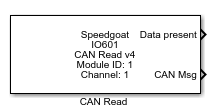
Description
The "CAN Read" block reads messages from one channel of the IO601 input queue.
In each execution step it reads one message and indicates if there are more
messages available.
The buffer size is 50 messages per channel. Take precaution when defining the
settings of the baud rate and the "CAN Read" block's sample time to avoid overflows
on the input buffer. Use the block status output port to verify this.
See "Usage Notes" to find out how this block can be used in a "do...while"
subsystem.
Ports
Which output ports are available depends on the "CAN message datatype" mask
setting:
CAN-MESSAGE: Only CAN message output is available.
RAW-MESSAGE: Data, Identifier, Length, Identifier Type and Timestamp
outputs are available.
RAW & CAN-MESSAGE: All output ports are available.
Outputs
-
Data present
The status signal is "1" if new data is available and "0"
otherwise.
Data
Types:boolean
-
CAN Msg
The complete CAN message. Please use the "CAN Unpack" block to resolve
the data.
Data
Types:CAN_MESSAGE
-
Data
The payload data of the CAN message.
Data
Types:uint8(8)
-
Identifier
The identifier of the CAN message.
Data
Types:int32
-
Length
The length of the payload data.
Data
Types:uint8
-
Identifier type
The identifier type of the CAN message:
Data
Types:uint8
-
Timestamp
The Timestamp of the CAN message. The resolution is 125µs, so in order
to get a double value in seconds, the block's output must be converted
to double and multiplied by 125e-6. The 125µs resolution is given by the
hardware implementation of the IO601 module. The time is reset to zero
at each model start.
Data
Types:uint32
Parameters
-
Module ID
This ID defines the link to the corresponding Setup block
-
Sample Time
Defines the base sample time at which this driver block gets its sample hit. This
parameter can also be set to -1 for inherited
sample time. The units are in seconds.
-
CAN message datatype
This defines how the CAN message is represented at the block outputs:
CAN-MESSAGE: Only one "CAN Msg" output port is available.
It will always be connected to one or multiple "CAN Unpack"
blocks.
RAW-MESSAGE: The message content is presented through five
output ports: "Data", "Identifier", "Length", "Identifier
Type" and "Timestamp".
CAN- + RAW-MESSAGE: Both versions are displayed.
-
Read CAN message from Channel
Select either "Port 1" or "Port 2" for this block.
With this parameter, Port 1/2 is used for Channel 1/2 in order to
maintain backwards compatibility.