IO601 - CAN Status v4
IO601 - CAN Status v4 — Provides CAN bus and CPU status
information
Library
Simulink Real-Time - Speedgoat
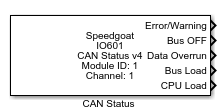
Description
This block provides CAN bus and CPU status information. Only one status block for
each CAN channel is allowed and they must have the same sample time.
Ports
Outputs
-
Error/Warning
A value of 1 signifies that the CAN channel reached an Error/Warning
level.
Data
Types:uint16
-
Bus OFF
A value of 1 signifies that the CAN channel reached the Bus Off
level.
Data
Types:uint16
-
Transmit Queue Overrun
A value of 1 signifies that the CAN channel's transmit queue has
overrun.
Data
Types:uint16
-
Transmit
A value of 1 signifies that the firmware is currently transmitting a
CAN Message.
Data
Types:uint16
-
Transceiver Error
A value of 1 signifies that the firmware detected a transceiver error.
This is only checked for the Lowspeed transceiver mode.
Data
Types:uint16
-
Receive Queue Overrun
A value of 1 signifies that the CAN channel's receive queue has
overrun.
Data
Types:uint16
-
Receive Queue Empty
A value of 1 signifies that the CAN channel's receive queue is
currently empty.
Data
Types:uint16
-
Receive
A value of 1 signifies that the firmware is currently receiving a CAN
message.
Data
Types:uint16
-
Bus Load
This value is equal to the percentage (0..100) of the total CAN bus
load.
Data
Types:uint16
-
CPU Load
This value is equal to the percentage (0..100) of the total
CPU/firmware load of the IO601 module.
Data
Types:uint16
-
Live Counter
This value counts up and wraps based on an internal IO601 counter.
This value can be used to check if the firmware on the IO601 is still
running (values change) and therefore as a test to see if the IO601
module is working properly.
Data
Types:uint16
-
Bus OFF Counter
This value counts up the "Bus OFF" signal.
Data
Types:uint16
-
STT
Single transmission try.
Data
Types:uint16
Inputs
-
Bus OFF Manual
With "1" impulse, the Status block will attempt to recover from a BUS
OFF state. After bus restart, the value should be set to zero.
Data
Types:boolean
Parameters
Status Setup
-
Module ID
This ID defines the link to the corresponding Setup block
-
Sample Time
Defines the base sample time at which this driver block gets its sample hit. This
parameter can also be set to -1 for inherited
sample time. The units are in seconds.
-
CAN Channel
Channel selection: Port 1 or Port 2
With this parameter Port 1/2 is used for Channel 1/2 in order to to
maintain backwards compatibility.
-
Bus OFF
Defines if and when the IO601 will try to recover from a "BUS OFF"
status.
Off: The bus will stay OFF. No recovery is
attempted.
Auto: The Status block will restart the CAN stack for both
channels to recover from the BUS OFF state.
Manual: The bus can be restarted from the
Application.
After a bus failure, in case of "Off" a bus will stay
off, in case of "Auto" a bus will be restarted automatically and in case
of "Manual" a bus can be restarted from the Application. In "Manual", an
application can initialize a bus restart with one impulse on the block
input.
-
Status Selection
In the "Status selection" tab the user can select the required status
signals. The selected signals appear as block outputs.