Quadrature - Decoder v2
Quadrature - Decoder v2 — The QAD driver block
allows quadrature encoders to be read.
Library
Simulink Real-Time - Speedgoat
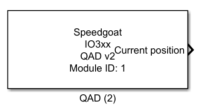
Description
The QAD driver block allows quadrature encoders to be read.
Ports
The width of all the inputs and all the outputs are equal to the channel count as
defined in the channel vector parameter.
Inputs
-
Async. value
The value to load to the counter when an asynchronous load is
requested. This port is enabled/disabled using the 'Show asynchronous
load value input port' parameter.
-
Async. command
Options for the input are:
0: position value is not modified
1: position value is set to zero
2: Position value is reset to the value(s) defined in
parameter field "Preload counter value", or if the "asynchronous
value" input port is present (by enabling the 'Show asynchronous
load value input port' parameter), the position value is reset
to the value from this port.
![[Note]](images/note.png) | Note |
|---|
Using this port introduces additional latency. This port is
enabled/disabled using the 'Show asynchronous command register input
port' parameter. |
-
Load on index value
The quadrature decoder will reload this value to the counter value
when index control mode is set to reload on index. This port is
enabled/disabled using the 'Show load on index input port' parameter.
Outputs
-
Current position
The most recently measured position. This port is enabled/disabled
using the 'Show current position output port' parameter.
-
Latched position
The position at the moment when the latch occurred. This port is
enabled/disabled using the 'Show latched position output port'
parameter.
-
Direction
The direction of rotation for the most recently measure position.
Possible values for each vector element are:
0: Counter-clockwise
1: Clockwise
This port is enabled/disabled using the 'Show direction
output port' parameter.
-
Index found
Indicates if the C/index position has been reached. Possible values
for each vector element are:
This port is enabled/disabled using the 'Show index
found output port' parameter.
-
Latch
Indicates if new latched data is present. If the index control mode is
not used (ignore index input), the C/Index line can be used for the
latched data, see parameter "Latch mode" for further information. If the
C/Index I/O line is used, an additional D (dedicated latched) I/O line
must be provided. Possible values for each vector element are:
This port is enabled/disabled using the 'Show latch
status output port' parameter.
Parameters
Tab: Module setup
-
Configurable I/O Module ID
This parameter associates a code module block with a configurable I/O module setup
block. Set this value to match the Module ID defined in the setup block of the
required configurable I/O module.
-
Channel Vector
A vector of channels this driver block entity will access. You can specify
channels in the range 1-N (N = the number of channels implemented in your specific
configuration file defined in the Setup block). The width of this vector also
defines the subsequent size of some of the following parameters if scalar expansion
applies. With a single block, all the channels of the block are synchronized.
-
Sample Time
Defines the base sample time at which this driver block gets its sample hit. This
parameter can also be set to -1 for inherited
sample time. The units are in seconds.
Tab: Quadrature decoder
-
Preload counter value vector
The counter value loaded when the model starts.
-
Operating mode
This QAD code module supports the following operating modes: Mode
Resolution Quadrature decoding 1x, 2x, and 4x Direction count 1x, and 2x
Up/down count 2x, and 4x
-
Sampling
Sampling resolution. Supported sampling resolutions are:
1x (Quadrature decoding, and direction count only)
2x (All modes)
4x (Quadrature decoding, and up/down count only)
-
Index control mode
Defines how the QAD code module reacts at each low to high transition
detected on the C/Input I/O line. Supported modes are:
Ignore index input: no action
Load on index: Loads the 'Load on index value' parameter
when the encoder index line goes high.
Index reference mode: Counter is reset to zero at the
first C/Index event detection and Index control mode then
changes to "Ignore index input"
-
Counting mode
The counter range (min and max). Options are:
Disabled (Cycling counter): Counter runs from
[-2'147'483'648 to + 2'147'483'647 (32-bit).
Divide-by-N: If this mode is selected, parameter field
'Counting limit' appears to define the counter value range
for a sampling resolution of one. Typical values are a power
of two, such as 1024, 2048, 4096.
-
Counting limit
This is enabled if the 'Counting mode' parameter is set to
'Divide-by-N'. See 'Counting mode' parameter description for more
information.
-
Latch mode
Counter latch mode. Options are:
Disabled: No latching
Latch on C/Index: Current counter value is stored into the
position register (latched). The counter value will only be
updated again at the next low to high transition event on
the C/Index line.
Hardware latch: latches counter value read by dedicated
hardware input (D-line).
Software latch: the model latches counter values for all
channels configured with the specific QAD driver
block.
Tab: Input and output port configuration
-
Show asynchronous command register input port
Enables/disables the Async. command input port, which is used to
dynamically change position values during real-time execution. Note that
enabling this port introduces additional latency. See Input and output
ports section for more information.
-
Show asynchronous load value input port
Enables/disables the Async. value input port. See Input and output
ports section for more information.
-
Show load on index value input port
Enables/disables the Load on index value input port. See Input and
output ports section for more information.
-
Show latch status output port
Enables/disables the Latch output port. See Input and output ports
section for more information.
-
Show direction output port
Enables/disables the Direction output port. See Input and output ports
section for more information.
-
Show index found output port
Enables/disables the Index found output port. See Input and output
ports section for more information.
-
Show latched position output port
Enables/disables the Latched position output port. See Input and
output ports section for more information.
-
Show current position output port
Enables/disables the Current position output port. See Input and
output ports section for more information.