IO753 - Network Status v2
IO753 - Network Status v2 — Outputs the network
status
Library
Simulink Real-Time - Speedgoat
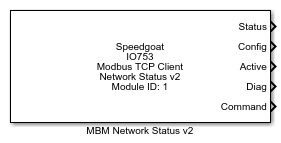
Description
The Network Status block outputs the connection state of the I/O module to each
Modbus TCP server in the network.
![[Caution]](images/caution.png) | Caution |
|---|
This block is only supported by MATLAB from R2019b. |
Ports
Inputs
-
Set State
The input signal enables or disables the communication of the I/O
module with the configured Modbus TCP servers. Use the Enable Set State Port parameter to hide or
unhide this port.
Outputs
-
Status
The output signal shows the general network status of the I/O module
in the Modbus TCP network.
Data Type: boolean
-
Config
The output signal indicates the configuration status for each Modbus
TCP server with which the I/O module is intended to communicate. The
length of the output signal depends on the number of IP addresses in the
command table. The first element of the vector refers to the first IP
address in the command table. The last element of the vector refers to
the last IP address in the command table.
Data Type: boolean
-
Active
The output signal indicates the communication status for each Modbus
TCP server with which the I/O module is intended to communicate. The
length of the output signal depends on the number of IP addresses in the
command table. The first element of the vector refers to the first IP
address in the command table. The last element of the vector refers to
the last IP address in the command table.
Data Type: boolean
-
Diag
For each Modbus TCP server with which the I/O module is intended to
communicate, the output signal indicates whether there is at least one
failing command. The length of the output signal depends on the number
of IP addresses in the command table. The first element of the vector
refers to the first IP address in the command table. The last element of
the vector refers to the last IP address in the command table.
Data Type: boolean
-
Command
The output signal provides the status of each command in the command
table. The length of the output signal depends on the number of commands
in that table. The first element of the vector refers to the first
command in the command table. The last element of the vector refers to
the last command in the command table.
Data Type: boolean
Parameters
-
Module ID
This ID defines the link to the corresponding Setup block
-
Sample Time
Defines the base sample time at which this driver block gets its sample hit. This
parameter can also be set to -1 for inherited
sample time. The units are in seconds.
| Caution |
|---|
All blocks that interface with the same I/O module must have identical
sample times. |
-
Retrieve Command Configuration
Retrieves the command configuration from the related Setup block and
updates the output ports.
-
Enable Set State port
Enable the Set State input
port.