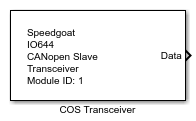
IO644 - Transceiver
IO644 - Transceiver — Sends and receive CAN
frames
Library
Simulink Real-Time - Speedgoat
Description
The Transceiver block enables direct transmission and reception of CAN frames,
bypassing the standard CANopen configuration of the I/O module.
Typical CANopen communication relies on EDS files, object dictionaries, and PDO
mappings. The IO644 PDO and Object blocks enable data exchange using this standard
approach. However, certain scenarios—such as dynamically sized PDOs—require
communication at the raw CAN frame level.
To send or receive a CAN message on the network, place one IO644 Transceiver block
per message. The block just requires the existence of the Setup block and can make
the IO644 module to act as an exclusive CAN module. Alternatively, it can be used
alongside the PDO and Object blocks to transmit and receive specific CAN messages in
parallel with standard CANopen PDO and SDO communication.
Ports
Inputs
-
Data
The data that should be sent. The port inherits the data type and the
dimensions from the connected source. This port is just a buffer. The
length to be sent can be less than the port size and can be defined by
the Length input port. The maximum
length is 8 bytes.
Data type: Fundamental data types
from boolean to double are supported as well as dimensions from scalar
values to vectors
-
Enable
If enabled by the Extended Interface
parameter, the block transmits the message as long as this input port is
TRUE.
If disabled, the message is sent each time the block gets a sample
hit.
Data type: boolean
-
Length
The size of the data that should be sent with the message, specified
in number of bytes.
If enabled by the Extended Interface
parameter and connected to a block other than the Ground block, the port
limits the size of the data to be sent. In this case, the block sends a
subset of the signal connected with the Data input port which results in a shorter CAN
message.
If disabled, the entire signal connected with the Data input port will be written to the
object.
Data type: uint32
Outputs
-
Data
Outputs the data received. The port inherits the data type and
dimensions from the Init Value
parameter. This port is just a buffer. Depending on the size of the data
that was last received, the port fills up the buffer with zeros. The
Length output port outputs the
actual size. The maximum length is 8 bytes.
Data type: Fundamental data types
from boolean to double are supported as well as dimensions from scalar
values to vectors
-
Status
A rising or falling edge indicates a message receipt.
Data type: uint32
-
Length
The size of the data that was last received. Defined in number of
bytes. The size can be less than the size of the Data output port.
Data type: uint32
Parameters
-
Module ID
This ID defines the link to the corresponding Setup block
-
Message ID
The ID of the CAN frame that should be sent or received. The ID must
be in the range 0 to 2047.
Multiple blocks can have the same message ID but different data port
dimensions or length information. This allows the user to handle dynamic
PDO lengths in Simulink.
The I/O module can receive only eight different message IDs. Only
sixteen CAN frames can be sent simultaneously in one time step of the
real-time application.
Data Type:
numeric scalar
-
Operation
This parameter defines whether to send or receive the CAN message.
Send enables the input ports.
Receive enables the output
ports.
-
Extended Interface
If selected, the block shows the Enable input port, the Status output port and the Length input and output ports. Otherwise, the ports are
hidden.
-
Sample Time
Defines the base sample time at which this driver block gets its sample hit. This
parameter can also be set to -1 for inherited
sample time. The units are in seconds.