IO644 - Object
IO644 - Object — Adds an object to the module's
object dictionary
Library
Simulink Real-Time - Speedgoat
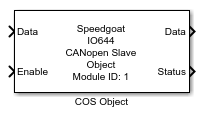
Description
The Object block adds an object to the module's object dictionary. Such an object
can be
a stand-alone object holding a value
a parent object with sub-objects
a sub-object holding a value
In addition to the base objects defined by the Setup and PDO blocks
(index range 0x1000 to 0x1FFF), the Object block is used for application-specific
objects. Depending on individual access rights, the remote CANopen master can read
and write these objects. Two protocols are defined for this purpose:
SDO (service data object): The master sends explicit read/write
requests addressing single (sub-)objects. The slave node responds
by sending the actual value of the object. This type of data exchange
has a low priority and is commonly used for reading and writing
parameters.
PDO (process data objects): (Sub-)objects are mapped into data
containers (PDO), which are configured for autonomous communication (no
request-response required). All objects defined by Object blocks are
mappable. Their PDOMapping attribute in the EDS file is always set to 1
(true). CANopen nodes transmit PDOs cyclically or on specific events.
This type of data exchange has a high priority and is commonly used for
the transmission of real-time data. RxPDOs are sent from the master to
the slave node. TxPDOs are sent from the slave to the master.
Defining an object with the Object block implicitly activates SDO
access. For PDO transfer, PDO blocks must be added to the model.
Ports
Outputs
- Data
Outputs the current value of the object. The port inherits the data
type and dimensions from the Init Value
parameter.
-
Status
A rising or falling edge indicates a completed SDO write
operation.
Data type: uint32
scalar
Inputs
-
Data
The value that should be written to the object. The port inherits the
data type and the dimensions from the Init
Value parameter.
-
Enable
The block writes data to the object as long as this input port is
TRUE.
Best practice is to set the block's sample time to a higher rate (like
1 ms) and trigger the Enable input port
at a lower rate. This allows event-based writing of the value as well as
immediate updates of the output ports.
Data type: boolean
scalar
Parameters
-
Module ID
This ID defines the link to the corresponding Setup block
-
Object Name
The name of the object or sub-object in the EDS file. The EDS
attribute name is ParameterName. This parameter is not considered for
the object dictionary during runtime.
-
Index
The index of the object you want to add to the dictionary or the index
of the parent object to which you want to add a sub-object. The index
must be in the range 0x0001 to 0xFFFF.
Data Type:
numeric scalar
-
Sub-Index
If the block represents a parent or stand-alone object, the sub-index
is 0.
For sub-objects, the parameter defines the index of the sub-object
inside the parent object. You define the parent object with another
Object block. The index must be in the range 1 to 255. Sub-indices must
start at 1 and must be continuous. To define an object with three
sub-objects, place four blocks in the model. One for the parent object
with sub-index 0, and three blocks for the sub-objects with sub-index 1,
2, 3.
Data Type:
numeric scalar
-
Object Type
The supported object types are:
VAR: The object is a stand-alone object or a sub-object
holding a value
ARRAY: The object is a parent object with sub-objects of
the same data type
RECORD: The object is a parent object with sub-objects of
different data types
Only Objects with Sub-Index 0 can be of type ARRAY and
RECORD. Types NULL and DOMAIN are not supported.
-
Data Type
The data type of the value the object holds. The parameter is visible
only if Object Type is VAR.
* For CANopen data types whose byte length do not match any
fundamental Simulink type, the next larger type is chosen, and the
remaining bytes are padded with zeros. Types BOOLEAN and DOMAIN are not
supported.
-
Access Rights
Defines the rights of the remote master when accessing the object's
value. The parameter is visible only if Object
Type is VAR.
By applying the CANopen standard less stringently, this parameter only
impacts the SDO communication. For PDO, all objects are mappable to
RxPDOs and TxPDOs.
* Description according to the CANopen standard. The IO644 handles rw,
rww and rwr the same.
-
Init Value
The object's value right after the model starts. The block outputs the
value in the first model step and holds it until it is overwritten by
either the input port or the remote master. The parameter is visible
only if Object Type is VAR.
The Init Value's data type must match
the Data Type parameter.
Examples:
-
Local Access
This parameter defines the local operation on the object's value. You
can read and write the value from Simulink. Write
enables the input ports. Read
enables the output ports.
-
Extended Interface
If selected, the block shows the Enable input port and the Status output port. Otherwise, the ports are hidden.
-
Sample Time
Defines the base sample time at which this driver block gets its sample hit. This
parameter can also be set to -1 for inherited
sample time. The units are in seconds.
![[Caution]](images/caution.png) | Caution |
|---|
All blocks that interface with the same I/O module must have identical
sample times. |