IO623 - Receive
IO623 - Receive —
Receives FlexRay frames
Library
Simulink Real-Time - Speedgoat
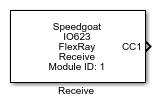
Description
Your model can only contain one of these blocks for each I/O module in your target
machine.
Ports
Outputs
-
CCX (X is the communication controller number)
FlexRay frames read from the receive buffer. The width of this output
is equal to the maximum number of frames to return.
Data Type:
Io623_FlexrayFrame
Parameters
The configuration details are all defined in the setup block.
-
Module ID
This ID defines the link to the corresponding Setup block
-
Max Number of Frames
Defines the maximum number of frames that can be received in one
sample step (equal to one FlexRay cycle).
Note that all the frames transmitted on the bus are received, not just
the frames specified in the CHI file. Set this value to at least the
number of slots you have configured per FlexRay cycle.
If more frames are received than specified by this parameter, then
they will be dropped and a warning message will be written to the target
machine log. The log is displayed on the target screen and can be
accessed by entering the following in the MATLAB command window:
log = SimulinkRealTime.utils.getConsoleLog()
-
Sample Time
Defines the base sample time at which this driver block gets its sample hit. This
parameter can also be set to -1 for inherited
sample time. The units are in seconds.