OPC UA - Client Write
OPC UA - Client Write — Writes the value of an OPC UA
variable node in the remote server
Library
Simulink Real-Time - Speedgoat
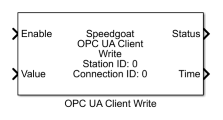
Description
The Write block writes the value attribute of a specific variable node in the
remote server. When the block is triggered by the input port, it sends out write
requests and updates the output ports according to the response received. You can
write multiple nodes with one Write block.
Ports
Inputs
-
Data
The values that should be written to the nodes in the remote server.
The port type can be
Scalar, if one scalar node is configured
Vector, if one node of type vector is configured
Matrix, if one node of type matrix is configured
Vector, if multiple scalar nodes of the same data type are
configured
Bus, if Bus Input is selected
The data type and dimensions are either inherited from
the connected source block or by the DataType and Dimension elements of
the struct defined in the Nodes
parameter. Both the data type and dimensions must match the data type
and dimensions of the node's value in the remote server. Otherwise, the
Status port outputs an
error.
Data type: Fundamental data types
from boolean to double are supported as well as dimensions from scalar
values to 2D-arrays
-
Enable
The block sends out write messages as long as the input port is TRUE.
The transmission of a message happens at each sample hit according to
the block's sample time.
Best practice is to set the block's sample time to a higher rate (like
1 ms) and trigger the Enable input port
at a lower rate. This ensures low network traffic and immediate updates
of the output ports once a response is received. Discover the OPC UA
product examples and learn how a Pulse Generator in conjunction with a
Detect Change block serve as a cyclic trigger.
Data type: boolean
Outputs
-
Status
Outputs the status code included in the confirmation message received
from the server. Successful data exchange is indicated by 0. This port
is visible if the Additional Outputs
parameter is selected. Otherwise, the port is hidden.
Data type: uint32
-
Time
Outputs the time included in the confirmation message received from
the server. A timestamp is represented by the number of milliseconds
since 1-Jan-1970 00:00:00 UTC. Refer to the OPC UA product examples to find out how to convert the
timestamp. This port is visible if the Additional
Outputs parameter is selected. Otherwise, the port is
hidden.
Data type: uint64
Parameters
General
-
Station ID
Apply the Station ID of the corresponding Setup block. Must range
between 0 and 65535.
-
Connection ID
Apply the Connection ID of the corresponding Connection block. Must
range between 0 and 65535.
-
Extended Node Configuration
Changes the mode of node configuration. Nodes to be written can be
defined either with parameters in the Node tab or with structs in the Nodes parameter. If selected, the Nodes parameter is visible and the Node tab is hidden.
-
Nodes
As an alternative to configuring a node in the Node tab, the node properties can be passed as a struct
to this parameter. The Extended Node
Configuration parameter must be selected for this
purpose. Define an array of struct for writing multiple nodes. The
required struct elements are:
Namespace (see Namespace parameter)
IdentifierType (see Identifier Type parameter)
Identifier (see Identifier parameter)
Dimension: The dimension(s) of the node. Possible values
are
1 for scalar values
n for vectors
[m, n] for 2D-arrays
DataType: The data type of the node. Must be passed as a
character array. Possible options are: double, single,
uint32, int32, uint16, int16, uint8, int8, boolean
You can create the struct in the base workspace, the model workspace
or in a data dictionary and pass the variable name to the mask
parameter. As an alternative, you can directly define the struct in the
mask parameter. Refer to the OPC UA Client Read
block content for further information about this parameter.
-
Bus Input
If selected, the values to be written are required as a bus signal.
The corresponding Simulink Bus object is automatically created in the
base workspace. Each defined node is represented by a bus element whose
name is derived from the node identifier. The matlab.lang.makeValidName
function is called to convert the identifier into a string that works
with code generation. For long strings, increase the Maximum Identifier Length model parameter.
The bus element holds the value to be written. Use Bus Assignment blocks
to write values to the bus elements.
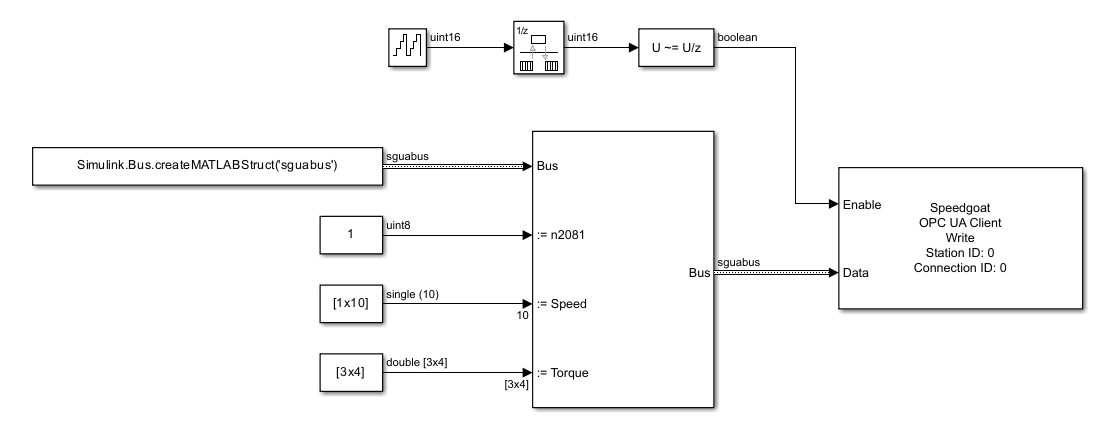
To ensure unique bus element names, use separate blocks for writing
nodes with the same identifier but different namespaces.
-
Bus Name
The name for the Simulink Bus object to be created in the base
workspace. The name must be a character array. An empty character array
results in an automatically created bus name based on the block name.
The matlab.lang.makeValidName function is called to convert the name
into a string that works with code generation. For long names, increase
the Maximum Identifier Length model
parameter. The parameter is visible if the Bus
Input parameter is selected. Otherwise, the parameter is
hidden.
-
Additional Outputs
If selected, the Status and Time ports output status and timestamp
information of the write operation.
-
Sample Time
Defines the base sample time at which this driver block gets its sample hit. This
parameter can also be set to -1 for inherited
sample time. The units are in seconds.
Node
This tab is visible if the Extended Node
Configuration parameter is cleared. Otherwise, the tab is hidden.
On the Node tab you can configure one single
node for writing.
-
Namespace
The index of the namespace to which the node is related.
-
Node Identifier Type
Defines the format of the Node
Identifier parameter. Refer to the OPC UA
Server Node block content for further information about this
parameter.
-
Node Identifier
The unique identifier of the node within the specified namespace.
Refer to the OPC UA Server Node
block content for further information about this parameter.