IO619 - Process Data
IO619 - Process Data — Receive/Transmit cyclic
data
Library
Simulink Real-Time - Speedgoat
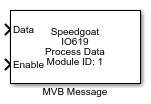
Description
This block receives/transmits cyclic data from/to the MVB network. The
configuration can be done manually or by a configuration file specified in the
corresponding Setup block.
Ports
The data type of the input/output data depends on the selected configuration mode
in the Setup block. If a configuration file is selected, the data type changes to a
Simulink bus, and a bus object containing the variables defined in the configuration
file is created in your workspace. Otherwise, the data type is a vector of
bytes.
Inputs
-
Data
Process data to be transmitted either as as a byte vector or a
Simulink bus.
-
Enable
Enable/Disable message transmission.
Outputs
-
Data
Process data to be received either as a byte vector or a Simulink
bus.
-
Freshness
Elapsed time from the last valid reception of the message in
milliseconds.
Parameters
-
Module ID
This ID defines the link to the corresponding Setup block
-
Address
Specify the address of the port.
-
Size
Select the amount of bytes each message contains.
-
Direction
Select if a message should be received or transmitted.
-
Sample Time
Defines the base sample time at which this driver block gets its sample hit. This
parameter can also be set to -1 for inherited
sample time. The units are in seconds.
-
Selected Port
Displays the selected port name. Click on the Select Port button to choose a port from the port list
of the configured device. This automatically updates the Port Address, Size, Direction and
Sample Time. By clicking the
Refresh Data button, the data of
the specified device is updated.
-
Freshness Data Type
Select the data type of the freshness output.
-
Show Enable Port
Select whether the enable input is active. Otherwise message
transmission is always enabled.