IO424 - Resolver Read
IO424 - Resolver Read — Reads the IO424 Resolver
inputs
Library
Simulink Real-Time - Speedgoat
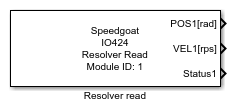
Description
Your model can only contain one of these blocks for each I/O module in your target
machine.
Ports
Outputs
-
POS (Position)
The measured rotational position in radians, degrees, or minutes. The
different output units can be selected in the Resolver Tab of the Setup
block. Each channel has its own port, indicated by its own number and
unit (e.g., POS1 [rad]).
Data Type:
double
-
VEL (Velocity)
The measured rotational speed is in rps (revolutions per second). To
see this port, enable the checkbox "Read Velocity" in the Main Tab of
the Resolver block. Each channel has its own port, indicated by its own
number (e.g., VEL1 [rps]). The data type of
this port is double, but the IO424 module provides a signed int
14-bit value so no decimal digits, only integer.
Data Type:
double
-
Status
The status bits for the Resolver channels. To see this port, enable
the checkbox "Read Status" in the Main Tab of the Resolver block. Each
channel has its own port, and each port has a width of 7 for the status
bits.
Data Type:
boolean
List of status bits. For a detailed explanation of each status bit,
refer to the Usage Notes.
Bit 1: Quadrant-Detection
Error (QUAD)
Bit 2: SIN/COS
Loss-of-Signal (LOS)
Bit 3: SIN Clipping (CLIP
SIN)
Bit 4: COS Clipping (CLIP
COS)
Bit 5: Excitation Frequency
too low (EXC LOW)
Bit 6: Excitation Frequency
too high (EXC HIGH)
Bit 7: Excitation Output
Overtemperature Flag (AMP OT)
Parameters
Main Tab
-
Module ID
This ID defines the link to the corresponding Setup block
-
Read Status
Enables status reading and provides a status output port for each
channel
-
Read Velocity
Enables velocity reading and provides a velocity output port for each
channel
-
Sample Time
Defines the base sample time at which this driver block gets its sample hit. This
parameter can also be set to -1 for inherited
sample time. The units are in seconds.