IO424 - LVDT/RVDT Read
IO424 - LVDT/RVDT Read — Reads the IO424 LVDT/RVDT
inputs
Library
Simulink Real-Time - Speedgoat
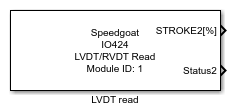
Description
Your model can only contain one of these blocks for each I/O module in your target
machine.
Ports
Outputs
-
STROKE
The measured linear/rotational position in percentage (±100 %). Each
channel has its own port, indicated by its own number (e.g.,
STROKE1[%])
Data Type:
double
-
Status
The status bits for the LVDT/RVDT channels. To see this port, enable
the checkbox "Read Status" in the Main Tab of the LVDT/RVDT Read block.
Each channel has its own port, and each port has a width of 7 for the
status bits.
Data Type:
boolean
List of status bits. For a detailed explanation of each status bit,
refer to the Usage Notes.
Bit 1: Quadrant-Detection
Error (QUAD)
Bit 2: La/Lb Loss-of-Signal
(LOS)
Bit 3: La Clipping (CLIP
La)
Bit 4: Lb Clipping (CLIP
Lb)
Bit 5: Excitation Frequency
too low (EXC LOW)
Bit 6: Excitation Frequency
too high (EXC HIGH)
Bit 7: Excitation Output
Overtemperature Flag (AMP OT)
Parameters
Main Tab
-
Module ID
This ID defines the link to the corresponding Setup block
-
Read Status
Enables status reading and provides a status output port for each
channel
-
Sample Time
Defines the base sample time at which this driver block gets its sample hit. This
parameter can also be set to -1 for inherited
sample time. The units are in seconds.