IO106 - Read channels
IO106 - Read channels —
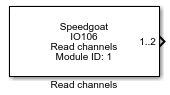
Reads the IO106 analog inputs
Library
Simulink Real-Time - Speedgoat
Description
This driver block together with the Start Conversion driver block can be used as
an alternative to the Analog input driver block. It only reads and returns the
acquired analog input channels and does not initiate the conversion. The latter is
then accomplished using a separate Start Conversion driver block. The separation of
Start Conversion and Read Channels is mainly used for situations where more than one
IO106 I/O module is present in a target machine, and the acquisition of input
channels is synchronized across the various IO106 I/O modules.
As the execution of this block and the Start Conversion block(s) has to be done in
a well-defined (deterministic) manner, these blocks provide special synchronization
(SYNC) input and output ports which can be turned on and off depending on the
block's dialog box settings (see below).
Ports
As this I/O module has a high channel count it was decided against returning each
analog input channel by a separate output port in order not to use too much real
estate in the model window. The single output port therefore returns a vector with
"Number of Channels" elements (except for the pseudo-differential input coupling
mode; see below). Each element is of type double and outputs the acquired channel
value in volts depending on the "Range" setting. The Demux or Selection block from
the Simulink library can be used to access individual elements (channels) in the
model.
For single-ended and differential mode the first element of the analog channels
output port is channel 1 and the last channel is defined by the "Number of Channels"
parameter in the corresponding Setup driver block.
For pseudo-differential mode the first element is channel 2 and the last channel
is defined by the "Number of Channels" parameter in the corresponding Setup driver
block.
Inputs
-
S (SYNC input port)
Start Conversion is executed if the signal value is TRUE, and not
executed otherwise. This port expects a logical (Boolean)-type signal.
Connection to a preceding block ensures that this block is executed
after the preceding block. This port is enabled if the "Show Input
Synchronization Port" box in the block's dialog box is checked.
Outputs
-
S (SYNC output port)
If the driver block's SYNC input port is not enabled, the value of
this port is TRUE. Otherwise it takes the value (TRUE or FALSE) entered
at the block's SYNC input port. This port outputs a logical
(Boolean)-type signal. Connection to a subsequent block ensures that
this block is executed before the subsequent block. This port is enabled
if the "Show Output Synchronization Port" box in the block's dialog box
is checked.
-
1..X (X is the last channel and is defined by the "Number of
Channels" setting in the module's "Setup" block dialog box)
A vector with n elements (where n is the number of analog input
channels defined by the "Number of Channels" parameter in the module's
"Setup" driver block). Each element corresponds to the value from an A/D
channel in volts. This port is enabled if the "Input Coupling" parameter
in the module's "Setup" block dialog box is set to Single-ended or
Differential.
-
2..X (X is the last channel and is defined by the "Number of
Channels" setting in the module's "Setup" block dialog box)
A vector with n elements (where n is the number of selected analog
input channels). Each element corresponds to the value from an A/D
channel in volts. This port is enabled if the "Input Coupling" parameter
in the module's "Setup" block dialog box is set to
Pseudo-differential.
Parameters
The configuration details are all defined in the Setup block.
-
Module ID
This ID defines the link to the corresponding Setup block
-
Show Input Synchronization Port
If checked, the block shows an input port to accept a SYNC
signal.
-
Show Output Synchronization Port
If checked, the block shows an output port which provides a SYNC
signal.
-
Sample Time
Defines the base sample time at which this driver block gets its sample hit. This
parameter can also be set to -1 for inherited
sample time. The units are in seconds.