ARINC 825 - Status
ARINC 825 - Status — Reads the channel status
information
Library
Simulink Real-Time - Speedgoat
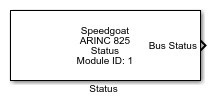
Description
Provides status information from the selected channel.
Ports
Outputs
-
Bus Status
Status of the CAN bus:
-
Rx Msg Cnt
Number of received messages for the selected channel.
-
Tx Msg Cnt
Number of transmitted messages for the selected channel.
-
Rx Error Cnt
Number of CAN receive errors.
-
Tx Error Cnt
Number of CAN transmit errors.
Parameters
-
Module Type
Select the type of your I/O Module installed in your target
machine.
-
Module ID
This ID defines the link to the corresponding Setup block
-
Bus Status
Select whether the bus status output is active.
-
Rx Message Count
Select whether the rx message count output is active.
-
Tx Message Count
Select whether the tx message count output is active.
-
Rx Error Count
Select whether the rx error count output is active.
-
Tx Error Count
Select whether the tx error count output is active.
-
Sample Time
Defines the base sample time at which this driver block gets its sample hit. This
parameter can also be set to -1 for inherited
sample time. The units are in seconds.