Serial - Write
Serial - Write — Writes to the serial
ports
Library
Simulink Real-Time - Speedgoat
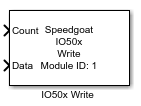
Description
This block is part of the Speedgoat Serial driver block set for the Speedgoat
Serial modules IO50X and IO581. The Serial Write block writes the data from the
input port (labeled D) to the FIFO in the I/O module UART for this port.
Ports
Inputs
-
Count
Amount of bytes to be transmitted.
-
Data
Data input signal.
Block Parameters
- Module Type
Select the type of your I/O Module installed in your target
machine.
-
Module ID
This ID defines the link to the corresponding Setup block
-
Channel
This parameter specifies the channel to which this block writes the
data.
-
Sample Time
Defines the base sample time at which this driver block gets its sample hit. This
parameter can also be set to -1 for inherited
sample time. The units are in seconds.
- Enable Legacy Mode
This checkbox can be used to enable/disable the legacy mode of the
Serial Write block. If this mode is enabled, the Data input must contain
a vector where the first element of the vector specifies the number of
data elements in the remainder of the vector.
- Enable ModelStop Message
When this checkbox is enabled, at ModelStop the character array or
string specified in the "ModelStop Message" will be sent.
- ModelStop Message
This is the string or character array sent at ModelStop. Only one
message is permitted (use one string, not a cell array). The message
size has two limitations: it must be equal to or smaller than the TX
FIFO size, and not larger than the maximum message size of 255 Bytes. If
a "delay" is required between the last message and the ModelStop
message, some padding could be used (a series of 0x0A or 0x00 before the
actual message).
- TX FIFO ModelStop
This option determines the behavior of the real-time target machine
(RTTM) transmit buffer during ModelStop. Write to
TX FIFO directly is the default and often the best
option. However, when the FIFO size is considerably large, and/or the
transmission baudrate is low, other options might be more
appropriate.
The following options are available:
Write to TX FIFO directly:
This copies the ModelStop message directly into the RTTM FIFO
without delay. The risk is that the TX FIFO may not have
sufficient space available for the entire ModelStop message,
meaning only a part of it will be copied and sent.
Wait for the TX FIFO to
empty: This option waits for the transmit buffer of
the RTTM to be empty before copying the ModelStop message to it.
This approach is the slowest of the three, but also the safest,
since it ensures that all the messages before the ModelStop
message are sent, and that the entirety of the ModelStop message
is also sent.
Flush TX FIFO: By selecting
this option, when the ModelStop is triggered, the TX FIFO of the
RTTM is emptied (flushed) and the entirety of the ModelStop
message is immediately copied. This method is the fastest way of
sending the ModelStop message, but there is a risk of the
previous incomplete message preventing the current ModelStop
message from being correctly received.