MQTT Usage Notes
MQTT Usage Notes —
Detailed information about the MQTT protocol and the native MQTT
blockset
Introduction to MQTT
MQ Telemetry Transport (MQTT) is an open communication protocol used mainly for
machine to machine (M2M) communication in IoT networks. The protocol is based on
TCP/IP and follows a publish-subscribe architecture. A client (Publisher) sends data
for a specific topic to the broker, which then passes the data to the other clients
(subscribers) that subscribed that topic. MQTT allows fast and efficient data
transfer, made possible by both the small protocol header and transmission not
requiring periodic requests. MQTT is supported on the real-time target machines’
native Ethernet interfaces and over Ethernet I/O modules. The MQTT protocol stack
runs on the target machine's CPU. Simulink driver blocks for client operation are
available.
For further information about MQTT, please read the MQTT Online Reference: https://mqtt.org/.
Typical Target Machine Configurations
Use the Ethernet Configuration Tool to assign IP addresses the target machine's
Ethernet interfaces. Enter the following in the MATLAB command window to open the
tool:
>> speedgoat.configureEthernet
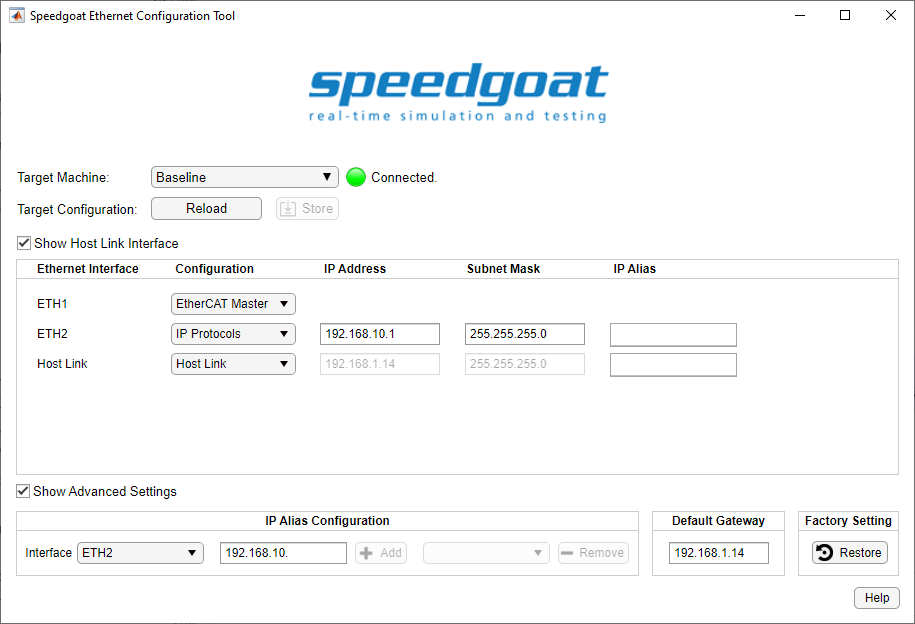
For MQTT, you can use any Ethernet interface when Configuration is set to IP
Protocols.
One real-time target machine can run multiple MQTT clients. There are 3 possible
configurations:
- One IP Address per Ethernet Interface
One IP address is assigned to one Ethernet interface. This Ethernet
interface acts as one MQTT client in the network. You can install
multiple Ethernet I/O modules (providing up to 4 interfaces each) or use
additional onboard Ethernet interfaces to set up multiple MQTT clients.
As all the Ethernet interfaces of a target machine must be associated
with different Ethernet subnets, each MQTT client must operate in
another Ethernet network. If an application requires multiple clients to
communicate with different MQTT networks, then this target configuration
is the correct choice.
The subnet dedication of an Ethernet interface is defined by IP
address and subnet mask.
- Multiple IP Addresses per Ethernet Interface (IP Aliasing)
IP aliasing can be used to assign multiple IP addresses to a single
physical interface. This allows multiple MQTT clients to be operated on
the same Ethernet I/O module or the same onboard Ethernet interface. As
the related IP addresses are always associated with the same Ethernet
subnet, this configuration is ideal for simulating an MQTT network
containing multiple clients. Alias addresses can be configured in the
advanced settings of the Ethernet Configuration Tool or by
functions.
Enter the following in the MATLAB command window to manage IP
aliasing:
>> ipAliasObj = speedgoat.IpAliasConfiguration()
>> ipAliasObj.add('ETH2', {'192.168.10.31','192.168.10.32','192.168.10.33'})
>> ipAliasObj.remove('ETH2', {'192.168.10.33'})
>> ipAliasObj.add('Host Link', {'192.168.1.15','192.168.1.19'})
Enter the following in the MATLAB command window to check the available
Ethernet interfaces and configured IP aliases:
>> ipAliasObj.show()
Interface Name      IP Address          Subnet Mask
---------------     ---------------     ---------------
ETH2                192.168.10.1        255.255.255.0
                    192.168.10.31       255.255.255.255
                    192.168.10.32       255.255.255.255
                    192.168.10.33       255.255.255.255
Host Link           192.168.1.14        255.255.255.0
                    192.168.1.15        255.255.255.255
                    192.168.1.19        255.255.255.255
- Multiple TCP Ports per IP Address
This is the normal operation for clients as each connection of the
client to a broker requires a separate TCP port.
Runtime License
MQTT blocks require a runtime license installed on the target machine. Please refer to
the Runtime
Licensing help.