MQTT - Client Publish
MQTT - Client Publish — Publishes an MQTT
topic.
Library
Simulink Real-Time - Speedgoat
Description
The Publish block publishes a topic to the remote broker and updates the topic's
data. The broker passes data to the subscribers each time the Publisher has send new
data.
Ports
Inputs
-
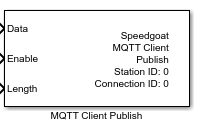
Data
The value that should be written to the topic in the remote broker.
The port inherits the data type and the dimensions from the connected
sink block. The data type and dimensions do not both need to match the
data type and dimensions of the record in the remote slave device, but
the overall number of bytes must be equal to or less than the size of
the record.
Data type: Fundamental data types
from Boolean to double are supported as well as dimensions from scalar
values to vectors
-
Enable
If enabled by the Extended Interface
parameter, the block sends out publish messages as long as the input
port is TRUE.
If disabled, the block sends out publish messages on each sample hit,
according to the Sample Time parameter,
and without checking data changes.
Best practice is to set the block's sample time to a higher rate (like
the model's base sample time) and trigger the Enable input port at a lower rate. You could also
connect this port with the output port of a Detect
Change block and connect the input port with your data to
be sent. This ensures low network traffic as the block will send publish
messages only on data changes.
Data type: Boolean
-
Length
The actual size of the data that should be written to the topic,
specified in number of bytes.
If enabled by the Extended Interface
parameter, the port limits the size of the data to be written to the
topic. The publish message will contain a subset of the signal connected
with the Data input port.
If disabled, the entire signal connected with the Data input port will be written to the topic.
This is also the case, if you ground the Length input port or do not
connect it at all.
Data type: uint32
Outputs
This block does not have any output ports.
Parameters
-
Station ID
Apply the Station ID of the corresponding Setup block. Must range
between 0 and 65535.
-
Connection ID
Apply the Connection ID of the corresponding Connection block. Must
range between 0 and 65535.
-
Topic
The topic whose data you want to publish. Topic is a character array.
Use the / character to build paths and address specific topic levels.
Examples:
Publish topic 'attribute7' of parent topic
'group0/port3':
'group0/port3/attribute7'
Publish topic 'port3' of parent topic 'group0':
'group0/port3'
-
Quality of Service
The Quality of Service is a flag in the publish message and tells the
broker on how to quarantee the delivery of messages.
0 - at most once: The broker does not confirm the receipt of a
data message and the message is not retransmitted by the
Publisher. This level allows the broker to immediately procees
the message received and allows the Publisher not to have to
preserve messages for retransmission.
1 - at least once: The broker confirms the receipt of a data
message by sending an acknowledge to the Publisher. If the
Publisher does not receive a confirmation in a specific amount
of time, the same data message is transmitted again.
2 - exactly once: The broker confirms the receipt of a data
message twice using a 4-way handshake. If the Publisher does not
receive the confirmation in a specific amount of time, the same
data message is transmitted again. This level increases the
overall time for processing data messages but ensures that the
same data is not processed multiple times.
-
Retain
The Retain flag in the publish message tells the remote broker to save
the last data received. This allows newly subscribed clients to receive
an immediate topic update.
-
Extended Interface
If selected, the block shows the Enable and the Length
input ports. Otherwise, the ports are hidden.
-
Sample Time
Defines the base sample time at which this driver block gets its sample hit. This
parameter can also be set to -1 for inherited
sample time. The units are in seconds.