IO756 - Send
IO756 - Send — Transmits cyclic data to the
EtherNet/IP scanner
Library
Simulink Real-Time - Speedgoat
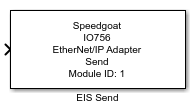
Description
This block is used to transmit data to the EtherNet/IP scanner connected with the
IO756 module.
Your model can contain only one Send block for each I/O
module in your target machine.
Ports
Inputs
In conjunction with the IO756 Setup v1 block, the Send block expects the data
for the sole input assembly defined in the Setup block mask. In conjunction with
the IO756 Setup v2 block, the input differs. If Simple
Mode is selected for the Setup block's Configuration Mode parameter, the Send block expects the data
for the sole input assembly. With Extended
Mode, the block expects the data for all input assemblies
defined.
- Simple Mode
One vector of data type UINT8, which holds the data for the sole input
assembly. This assembly contains data that will be sent to the
EtherNet/IP scanner. Use Byte Packing
blocks to assemble the vector from specific data. The Number of Bytes parameter sets the length of
this vector.
- Extended Mode
The block shows one input port for each input assembly defined in the
corresponding Setup block. Each port is a vector of data type UINT8,
which holds the data of the specific assembly. This data will be sent to
the EtherNet/IP scanner.
Outputs
This block does not have any output ports.
Parameters
Depending on the version of the corresponding Setup block, some parameters might
be invisible.
-
Module ID
This ID defines the link to the corresponding Setup block
-
Port Type
Always select 1 port with n element vector of type
uint8
-
Number of Bytes
This parameter defines the length of the input port and thus the
number of bytes to be written to the input assembly.
-
Sample Time
Defines the base sample time at which this driver block gets its sample hit. This
parameter can also be set to -1 for inherited
sample time. The units are in seconds.
![[Caution]](images/caution.png) | Caution |
|---|
All blocks that interface with the same I/O module must have identical
sample times. |
-
Retrieve Configuration
Retrieves the assembly configuration from the related Setup block and
updates the input ports.