IEC 61850 - Client Transceiver
IEC 61850 - Client Transceiver — Reads/writes data
from and to the input and output port of the block
Library
Simulink Real-Time - Speedgoat
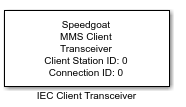
Description
This block is used to send and receive data attribute values or to send direct
control commands for data objects to the remote MMS Server. Your model can contain
multiple IEC 61850 Client Transceiver blocks for each MMS Connection in your target
machine. To be able to select data attributes, a .cid file must be imported into the
Transceiver from the remote intelligent electronic device (IED).
Ports
Inputs
-
Data Attribute
For each data attribute selected, an input port is created and will
generate write requests to the MMS server.
-
Operate Data Object
The Operate port allows the user to manage the direct control command.
This input is only active if the Activate Control
Mode checkbox is enabled and at least one data object is
selected. Send a boolean value of 1 to operate or 0 to disable the
transmission of operate commands.
-
Data Object
A port is created for each data object selected for direct control.
The port takes the value to be sent to the IED for operation. This input is
only active if the Activate Control
Mode checkbox is enabled.
Outputs
-
Data Attribute
Each output port represents a data attribute and will send read
requests to the MMS server. The data type of the output port is defined
in the Transceiver Port Data Type
dropdown list in the block mask.
Use Byte Unpack blocks to convert to signed values or floating-point
numbers. You can unpack a vector of type uint16 and length 4 to one
double value.
Parameters
-
Client Station ID
Apply the Client Station ID of the corresponding Setup block. Must
range between 0 and 65535.
-
Connection ID
Apply the Connection ID of the corresponding Connection block. Must
range between 0 and 65535.
-
Polling Time
The polling time is the time interval between sending MMS messages to
the server. Must range between 0 and 360,000 ms, which corresponds to a
maximum of 6 minutes. The default value is 50 ms.
-
Data Attribute Type
This dropdown list defines the data attribute type. The supported data
types are:
Double
Single
The port will be a float.
Int8 / Uint8
The port will be a signed or unsigned byte.
Int16 / Uint16
The port will be two signed or unsigned bytes.
Int32 / Uint32
The port will be four signed or unsigned bytes.
Boolean
ASCII or Unicode String
The port will be an array of uint8, max. 255 bytes.
-
Activate Control Mode
Set the Transceiver block to control mode.
Refer to the IEC 61850 usage
notes for further information about the control
mode.
-
Sample Time
Defines the base sample time at which this driver block gets its sample hit. This
parameter can also be set to -1 for inherited
sample time. The units are in seconds.
Choose SCL-File
There are two ways to load a data model into the block mask:
...from Host PC
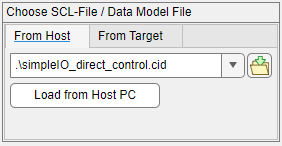
Search for the .cid file on your host PC that you would like to load into the Data
Model Navigator by pressing the button on the right hand side. After the path has
been inserted into the edit field, press the button below Load
from Host PC.
...from Target
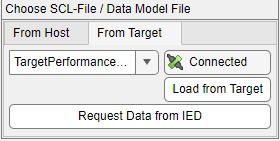
When a runtime application with IEC 61850 Client blocks starts, the
Connection blocks locally store the data model of each remote IED/Server on the
target machine. This facilitates reloading the data model later, even if no remote
device is connected to the target machine. Before clicking Load from Target, ensure that the Station ID and the ConnectionID
above are set correctly.
Request Data from IED will create a connection to
a previously configured remote IED/Server and sends a single request to get its data
model. Once again, ensure that the Station ID and the Connection ID are set
correctly.