IEC 61850 - Client Connection
IEC 61850 - Client Connection — Establishes a unique
connection to a remote IEC 61850 Server.
Library
Simulink Real-Time - Speedgoat
Description
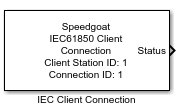
The Connection block connects the local IEC 61850 Client to one remote IEC 61850
Server. Each server connection requires a Connection block in the model. Your model
can contain multiple Connection blocks for each IEC 61850 Client station in your
target machine.
Ports
Outputs
-
Status
Uint8 output to inform the user about the connection status to the MMS
Server. 0 means disconnected and 1 means connected.
Parameters
-
Client Station ID
Apply the Client Station ID of the corresponding Setup block. Must
range between 0 and 65535.
-
Connection ID
The Connection ID is used to assign Connection and Transceiver blocks
to a particular client connection. Connection IDs range between 0 to
65535 and must be unique for each Client (Station ID).
-
Remote Server IP Address
Enter the IP address of the MMS Server to which you want to
connect.
-
Remote TCP Server Port
Enter the TCP Port of the MMS Server. The default port for MMS is 102.
The reserved ports should not be used. Refer to the following online
documentation: List of TCP and UDP Port Numbers
-
Sample Time
Defines the base sample time at which this driver block gets its sample hit. This
parameter can also be set to -1 for inherited
sample time. The units are in seconds.