CAN Message Utilities: Counter Validation
CAN Message Utilities: Counter Validation — Extracts a previously
inserted counter value from a CAN or CAN-FD message payload and determines its
validity.
Library
Simulink Real-Time - Speedgoat
Description
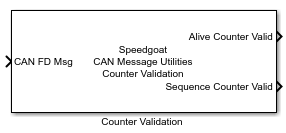
The Counter Validation block extracts a Counter value of a certain bit width from
a certain bit position of the data payload of a CAN or CAN-FD frame. The alive
status and correct sequence of the extracted counter are
verified to ensure the counter value is valid. The result of both checks are sent
through the output ports.
The block inherits the sample time from the CAN or CAN-FD message line connected
to its input.
Ports
Which input and output ports are available depends on the settings configuration
in the block mask
Input
-
Message Port
This input port is always available and its datatype (either
CAN_MESSAGE_BUS, CAN_FD_MESSAGE_BUS or a uint8 array with a maximum
length of 256 bytes) is configured by the Protocol parameter in the block mask.
Outputs
-
Extracted Counter
Select Extracted Counter Port in the
mask to enable this output port. This port outputs the value of the
counter extracted from the payload (Extracted
Counter) from the position defined by Counter
Location (bits) and Counter Length
(bits) mask parameters.
-
Alive Counter Valid
Select Alive Counter Valid Port in
the mask to enable this output port. This port outputs the result of the
Alive Counter check: 1 if the
Extracted Counter is alive, otherwise 0. The
Extracted Counter is considered alive if the
two most recent consecutive messages with distinct timestamps report
different counter values. The port then indicates the alive status of
the most recent message.
The initial value of this port is always 0 because there is no
preceding message to compare counter values.
-
Sequence Counter Valid
Select Sequence Counter Valid Port in
the mask to enable this output port. This port outputs the result of the
Sequence Counter check: 1 if the
Extracted Counter follows the correct
increment, otherwise 0. The Extracted Counter is
considered to be correctly incrementing if the two most recent
consecutive messages with distinct timestamps report counter values that
increment according to the counter parameters defined in the mask. The
port then indicates the sequence status of the most recent
message.
The initial value of this port is always 0 because there is no
preceding message to compare counter values.
Parameters
-
Extracted Counter
Adds an "Extracted Counter" output port to send the value of the
counter extracted from the message payload.
-
Alive Counter Valid
Adds an "Alive Counter Valid" output port to send the result of the
Alive Counter check.
-
Sequence Counter Valid
Adds a "Sequence Counter Valid" output port to send the result of the
Sequence Counter check.
-
Counter Start Value
The initial value of the internal counter.
-
Counter Stop Value
The stop value of the internal counter.
-
Counter Step Value
The value by which the internal counter is increased at each block
execution.
-
Counter Location (Bits)
The location, expressed in bits, from where the counter is extracted
from the payload. Counter Location is expressed in 0-based indexing (for
example if the user wants to extract the counter from the 2nd byte, this
parameter should be configured to the value 8).
-
Counter Length (Bits)
The number of bits that are extracted from the message payload to
obtain the Extracted Counter value (starting from
the Counter Location parameter).
-
Protocol
This parameter determines the datatype of the block's input
port.