Modbus - Client Connection
Modbus - Client Connection — Establishes a unique
connection to a remote Modbus TCP Server.
Library
Simulink Real-Time - Speedgoat
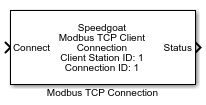
Description
The Connection block connects the local Modbus TCP Client to one remote Modbus TCP
Server. Each server connection requires a Connection block in the model. Your model
can contain multiple Connection blocks for each Modbus TCP Client station in your
target machine.
Ports
Inputs
-
Connect
Boolean input to allow the user to request a connection to the defined
Modbus server. This input is deactivated if the Auto Connect checkbox is enabled.
Outputs
-
Status
Boolean output to inform the user when a connection with the defined
Modbus server is established.
Parameters
-
Client Station ID
Apply the Client Station ID of the corresponding Setup block. Must
range between 0 and 65535.
-
Connection ID
The Connection ID is used to assign Connection and Transceiver blocks
to a particular client connection. Connection IDs range between 0 to
65535 and must be unique for each Client (Station ID).
-
Remote Server IP Address
Enter the IP address of the Modbus server to which you want to
connect.
-
Remote Server TCP Port
Enter the TCP Port of the Modbus server; the default port for Modbus
is 502. The reserved ports should not be used. Refer to the following
online documentation: List of TCP and UDP Port Numbers
-
Swap Register Bytes
The bytes of a register must be swapped if the sender and the receiver
interpret the byte order in different ways (endianness). The Speedgoat
real-time target machine uses little-endian, while some servers use big-endian.
If the swap option is enabled, all register values from the
application context will be swapped before they are sent to the network.
All register values received from the network will be swapped before
they are submitted to the application context. The swap option only
affects input registers and holding registers (transmitted by function
codes FC3, FC4, FC5, FC6, FC16). Discrete inputs and coils are not
affected. Use Byte Reversal blocks instead of enabling the global byte
swapping if only single registers need to be swapped.
-
Concurrent Transmission
If selected, the Transceiver blocks associated with the Connection
block send Modbus request messages to the remote Modbus server device
simultaneously. The transmission is never delayed and the Transceiver
blocks do not impact each other.
If not selected, the Transceiver blocks send Modbus messages one after
the other. A Transceiver may only send its request message after the
previous Transceiver has received a response. This option allows the
client to communicate with server devices which only process the first
request message in the Ethernet input buffer and discard the remaining
ones.
-
Auto Connect
To facilitate the connection handling, the Auto Connect function tells
the Connection block to establish a connection with the Modbus server as
soon as possible. If the connection is closed, the Connection block will
try to reopen a connection automatically.
-
Sample Time
Defines the base sample time at which this driver block gets its sample hit. This
parameter can also be set to -1 for inherited
sample time. The units are in seconds.