IO291 - FET digital output
IO291 - FET digital output —
Writes the IO291 FET digital outputs
Library
Simulink Real-Time - Speedgoat
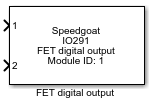
Description
To write to the FET digital outputs, exactly one of these blocks must be added to
your model for each IO291 I/O module in your target machine.
Ports
This driver block has no output ports. The number of input ports is determined by
the number of digital output channels selected, and the Port
Configuration setting.
The input ports can be configured in the following two ways:
1 port with an 8-element vector
One input port with a fixed width of 8 is used. The index of each array element is
equivalent to the channel number. Array elements for channels that have not been
configured as digital outputs have no effect. Each element should have a value of
either 0 (Low) or 1 (High). Other values can also be used, in which case a threshold
of 0.5 is used to determine if the output state is Low (< 0.5) or High (>=
0.5).
1 port for each active output channel
For each channel configured as digital output, one input port is added. Each port
should have a value of either 0 (Low) or 1 (High). Other values can also be used, in
which case a threshold of 0.5 is used to determine if the output state is Low (<
0.5) or High (>= 0.5).
Supported Data Types:
boolean, double, single,
int8/16/32, uint8/16/32
Parameters
The configuration details are all defined in the Setup block.
-
Module ID
The Module ID has two functions:
It defines the logical connection between the Setup block and its I/O
blocks
It also informs the auto-search feature of the PCI Slot parameter. If
only one I/O module of this type is installed, the Module ID must be set
to 1. If n modules are installed, it
must be in the range 1:n. Not all the I/O modules installed in the
target machine need to be used. To see how each I/O module maps to a
Module ID, use this Speedgoat API:
speedgoat.getIoInterfaces("TargetName", "mySpeedgoat")
-
Sample Time
Defines the base sample time at which this driver block gets its sample hit. This
parameter can also be set to -1 for inherited
sample time. The units are in seconds.
-
Port Configuration
Select one of the two available port types.