Interrupt Setup Usage Notes
Interrupt Setup Usage Notes — Using Interrupts
with Referenced Models
Using Interrupts with Referenced Models
![[Important]](images/important.png) | Important |
|---|
This documentation applies to Speedgoat I/O Blockset v9.3.1 and
later. |
The Interrupt Setup block cannot be used inside a referenced model due to a
limitation within Simulink Coder, which does not allow asynchronous blocks to be
used in this context.
When used as model trigger, the Interrupt Setup block must be placed in the top
level model. This will define the fundamental sample time used by all referenced
models.
If your application requires asynchronous interrupts generated by Speedgoat I/O
modules to be used within referenced models, simply follow the steps in the example
below.
Required Changes in the Referenced Model
Let us start with a model that uses the interrupt of the IO135 I/O module to
trigger a Function-Call Subsystem. Our goal is to integrate this as a model
reference in a top model named ex_int_refmdl_top.slx
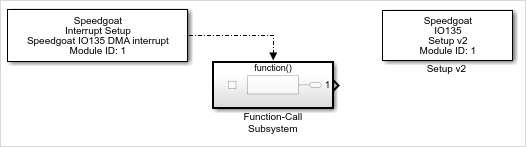
Copy the Interrupt Setup block into your top model and replace it with
an Inport and an Asynchronous Task Specification block
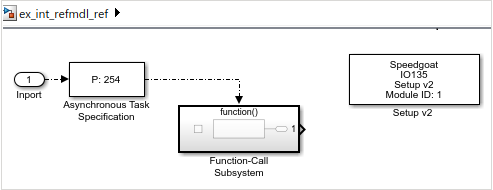
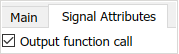
Configure the Inport so that it generates a function call output
Configure the Asynchronous Task Specification block so that it
specifies the same priority as the Interrupt Setup block: The default
setting is High which translates to a
priority value of 254
![[Note]](images/note.png) | Note |
|---|
By implementing these changes, the model can no longer be
built by itself and the following error message will
display: 
Do not click the Fix button.
The code generation target must remain set to a Simulink
Real-Time system target file (STF). |
Required Changes in the Top Model
Place the Interrupt Setup block in the top level model and add your
Model Reference
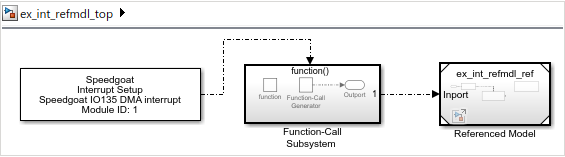
If you copied the Interrupt Setup block from the referenced model, the
block will retain its configuration. Otherwise, you can find all
Speedgoat interrupt sources from your referenced models using the
Select Interrupt button in the
Interrupt Setup block mask.
Instead of connecting the Interrupt Setup block's output directly to
the referenced model, you must add a Function-Call Subsystem in between.
In this subsystem, add a Function Generator block and connect its output
to an Outport
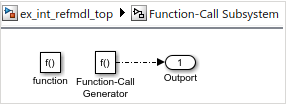
Connect the output of the Function-Call Subsystem to the Model
Reference block
When you build the top model, you will see this error message:

Use the Fix button to restrict the
number of allowed instances to 'One'. The build should now succeed and
it will also build the referenced model.