IEC 61850 Usage Notes
IEC 61850 Usage Notes — Detailed information about
the IEC 61850 protocol and the native IEC 61850 blockset
Introduction to IEC 61850
IEC 61850 is a standard about Ethernet communication protocols mostly used for
intelligent electronic devices (IEDs) in electrical substations. The three defined
protocols are: Manufacturing Message Specification (MMS), Generic Object Oriented
Substation Event (GOOSE) and Sampled Values (SV).
IEC 61850 Communication
MMS is a TCP/IP-based communication protocol that allows interoperability between
electrical components such as SCADAs or IEDs mainly found in electrical substations.
These components are either client or server. One client connects to multiple
servers to read and write data in order to: 1). exchange surveillance values and
general information about a substation, such as continuous data reports, or; 2).
send control commands, for example, to operate protection relays through direct
control. This information is managed by the server in a data model, with logical
devices, logical nodes, data objects and data attributes:

Each logical device can contain multiple logical nodes. Each logical node can
contain multiple data objects and for every data object there can be multiple data
attributes. A logical node describes a function of a logical device. Each logical
node has data objects with predefined data attributes.
In MMS networks, each physical device has a
unique IP address. Servers normally listen on the TCP port 102 for incoming
connection requests from clients. TCP port numbers on the client side are
random.
GOOSE is a fast and reliable publisher-subscriber
protocol used mainly for IED-to-IED communication at bay level. The standard defines
that a GOOSE message must be transmitted within 4 ms. This is achieved by embedding
the data directly into Ethernet packets and using VLAN with priority tagging. The
GOOSE publisher sends messages at certain intervals and when a value change occurs
(meaning an event happened), the publisher will reduce the time interval and send
messages more frequently until the interval gradually returns to the standard
length. This behavior reduces the loss of data since GOOSE does not use
confirmation/acknowledgement messages. Consequently, the publisher will never know
if a subscriber has successfully received the data.
Sampled Values is a publisher-subscriber protocol
used to transmit analog values in digital format at process level between IEDs and
merging units. SV also uses VLAN and priority tagging. The SV publisher sends
messages at predefined intervals. The intervals are defined by the signal frequency
and the samples per period (SPP).
For further information about IEC 61850, refer to the official online IEC 61850 documentation.
Substation Configuration Language File
The IEC 61850 standard defines a specific xml-based configuration language called
Substation Configuration Language . There are various supported file types for the
SCL standard. The two important files used for the Speedgoat IEC 61850 block library
are:
IED Capability Description (ICD)
The ICD file is always supplied by the manufacturer of an IED. This
file describes the capabilities the IED requires to complete the system
configuration. The file contains a single IED section and can optionally
also provide the communication and substation sections.
Configured IED Description (CID)
The CID file describes the important parts for communicating with the
IED, such as the IP address and TCP port. It contains a mandatory
communication section of the addressed IED.
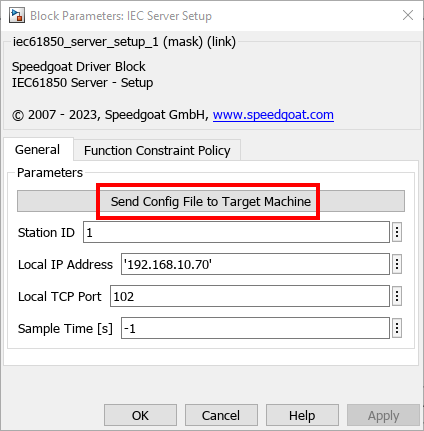
To configure the MMS Server, you need to import a CID file. Follow the
instructions on the block mask to complete this step.
Typical Target Machine Configurations
For IEC 61850 communication with Speedgoat target machines, you can use onboard
Ethernet interfaces and plug-in Ethernet I/O modules.
Use the Ethernet Configuration Tool to assign IP addresses to these Ethernet
interfaces. Enter the following in the MATLAB command window to open the tool:
>> speedgoat.configureEthernet
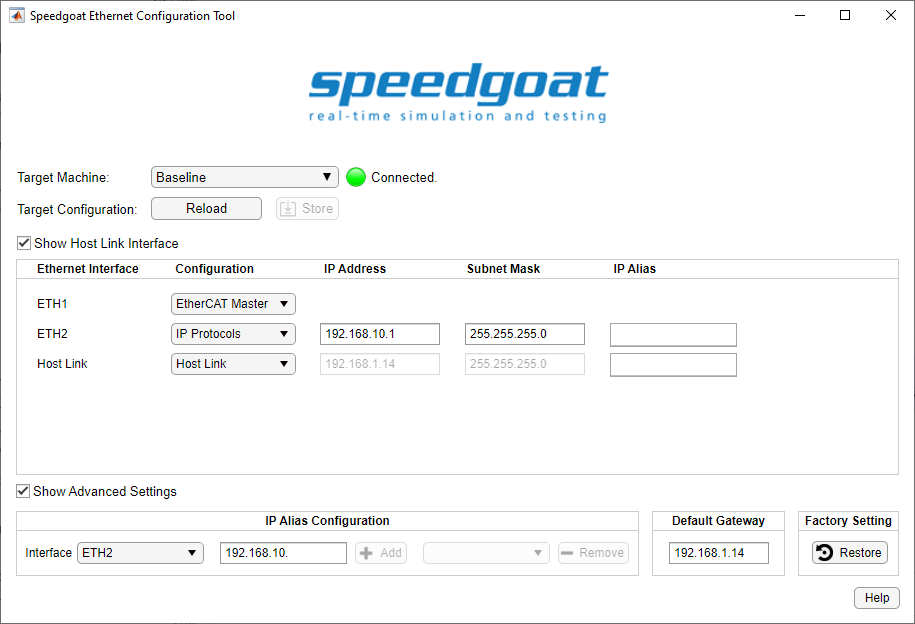
For IEC 61850, you can use any Ethernet interface when Configuration is set to IP
Protocols.
One real-time target machine can simulate multiple IEC 61850 clients and servers.
There are four possible configurations:
- One IP Address per Ethernet Interface
One IP address is assigned to one Ethernet interface. This Ethernet
interface acts as either one IEC 61850 client or one IEC 61850 server in
the network. You can install multiple Ethernet I/O modules (providing up
to 4 interfaces each) or use additional onboard Ethernet interfaces to
set up multiple IEC 61850 clients or servers. As all the Ethernet
interfaces of a target machine must be associated with different
Ethernet subnets, each IEC 61850 station must operate in another
Ethernet network. If an application requires multiple clients to
communicate with different IEC 61850 networks, then this target
configuration is the correct choice. In contrast, if the simulation of a
IEC 61850 network with multiple servers is required, this setup cannot
be used.
The subnet dedication of an Ethernet interface is defined by IP
address and subnet mask.
- Multiple IP Addresses per Ethernet Interface (IP Aliasing)
IP aliasing can be used to assign multiple IP addresses to a single
physical interface. This allows multiple IEC 61850 clients and servers
to be operated on the same Ethernet I/O module or the same onboard
Ethernet interface. As the related IP addresses are always associated
with the same Ethernet subnet, this configuration is ideal for
simulating an IEC 61850 network containing multiple servers. Even mixed
operation (client and server) is possible for the purpose of loopback
testing. Alias addresses can be configured in the advanced settings of
the Ethernet Configuration Tool or by functions.
Enter the following in the MATLAB command window to manage IP
aliasing:
>> ipAliasObj = speedgoat.IpAliasConfiguration()
>> ipAliasObj.add('ETH2', {'192.168.10.31','192.168.10.32','192.168.10.33'})
>> ipAliasObj.remove('ETH2', {'192.168.10.33'})
>> ipAliasObj.add('Host Link', {'192.168.1.15','192.168.1.19'})
Enter the following in the MATLAB command window to check the available
Ethernet interfaces and configured IP aliases:
>> ipAliasObj.show()
Interface Name      IP Address          Subnet Mask
---------------     ---------------     ---------------
ETH2                192.168.10.1        255.255.255.0
                    192.168.10.31       255.255.255.255
                    192.168.10.32       255.255.255.255
                    192.168.10.33       255.255.255.255
Host Link           192.168.1.14        255.255.255.0
                    192.168.1.15        255.255.255.255
                    192.168.1.19        255.255.255.255
- Multiple TCP Ports per IP Address
This is the normal operation for clients as each connection of the
client to a server requires a separate TCP port.
For server simulation, you can ignore the default server port 102 and
allow multiple servers to listen on different TCP ports. All these
servers will then act in the same subnet.
Runtime License
IEC61850 blocks require a runtime license installed on the target machine. Please refer
to the Runtime
Licensing help.