IEC 61850 - Server Setup
IEC 61850 - Server Setup — Configures one IEC 61850
server node
Library
Simulink Real-Time - Speedgoat
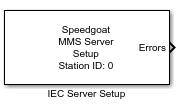
Description
The Setup block configures one MMS server node, opens the TCP port for incoming
connection requests and enables the read and write blocks to exchange data with the
local server data model. Every MMS Server block in the model requires a runtime
license.
Ports
This driver block has no input or output ports.
Parameters
Tab: General
-
Send Config File to Target Machine
By clicking this button, the user can select a .cid file which then is
converted into a .cfg file and sent to the chosen target machine. This
.cfg file is needed to configure the Intelligent Electronic Device (IED)
data model. The same procedure can be done from the server block
mask.
-
Station ID
The Station ID is used to assign Setup, Read, and Write blocks to a
particular server node. Station IDs range between 0 to 65535 and must be
unique in a model.
-
Local IP Address
Enter the IP address of the MMS server. This step does not assign the
IP address to an Ethernet interface. Instead, it binds the Setup block
to an IP address which was previously configured in the Ethernet
Configuration Tool. Refer to the IEC 61850 usage
notes for further information.
-
Local TCP Port
The TCP port the server listens on for connection requests from the
client. The default port is 102. For a custom port address, select
between the range 0 and 65535. The reserved ports should not be used.
Refer to the following online documentation:
List of TCP and UDP Port Numbers
-
Sample Time
Defines the base sample time at which this driver block gets its sample hit. This
parameter can also be set to -1 for inherited
sample time. The units are in seconds.
Tab: Function Constraint Policy
-
Function Constraints
By selecting a function constraint, the server will allow clients to
write to these function constraints.