DNP3 - Client Setup
DNP3 - Client Setup — Configures the DNP3 client
software stack
Library
Simulink Real-Time - Speedgoat
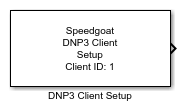
Description
The Setup block configures the DNP3 client protocol stack, opens connections to
DNP3 servers and enables the Class and Command blocks to exchange data on the
network.
Ports
Outputs
-
Status
A vector of data type UINT8 which indicates the connection status for
each client-server communication relation. The order of elements
reflects the order of servers in the Server
Table.
Data Type: uint8
Inputs
This block does not have any output ports.
Parameters
Tab: General
-
Client ID
This is the DNP3 address of the client. DNP3 addresses must be unique
in a network and range between 0 to 65519.
-
IP Address
Enter the IP address of the DNP3 client. This step does not assign the
IP address to an Ethernet interface. Instead, it binds the Setup block
to an IP address which was previously configured in the Ethernet
Configuration Tool. Refer to the DNP3 usage notes for
further information.
There is no need to specify a TCP port as TCP ports are automatically
assigned to clients.
You can define multiple clients acting on the same IP address but
different TCP ports. Insert the number of required Setup blocks in the
model and apply the same IP address. Unique TCP ports are then
automatically assigned. Specify a unique Client ID for each Setup
block.
Furthermore, you can assign additional IP addresses to the same
Ethernet interface by using IP aliasing. Those addresses must be in the
same subnet. Refer to the DNP3 usage notes for
further information.
-
Keep-Alive Interval
The client periodically sends keep-alive messages (status link
messages) to the servers on the DNP3 link layer. This parameter
specifies the send rate and also acts as the timeout. If the timeout is
reached, the client indicates connection lost.
The units are in milliseconds.
-
Receive Timeout
The time the client waits for the response to a sent request before
indicating an error.
The units are in milliseconds.
-
Sample Time
Defines the base sample time at which this driver block gets its sample hit. This
parameter can also be set to -1 for inherited
sample time. The units are in seconds.
As the DNP3 stack is performed in several background threads, the
Sample Time defines the update rate
of the Setup block's outputs only.
Tab: Servers
- Server Table
This table defines the remote DNP3 servers to which the client should
connect. Use the buttons to add, move or delete stations. The number of
servers is limited to 255.
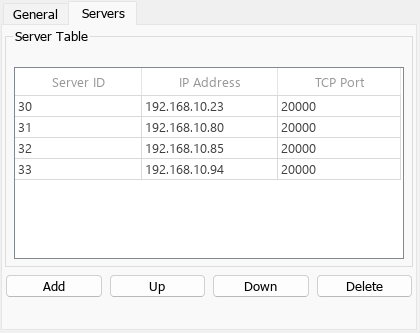
Server properties:
Server ID: The DNP3
address of the server. DNP3 addresses must be unique in the
network and range between 0 to 65519
Server Address: The IP
address of the server in the DNP3 network
TCP Port: The TCP port on
which the server is listening for incoming connect requests
from the client. The default port for DNP3 communication is
20000