DNP3 - Client Command
DNP3 - Client Command — Reads, controls and freezes
data points in remote DNP3 servers
Library
Simulink Real-Time - Speedgoat
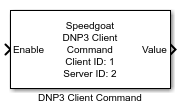
Description
This block is used to send read, control and freeze requests to remote DNP3
servers, and to output the related response. The block also outputs unsolicited
messages as well as responses to events and integrity polls whose point definition
matches the block parameters. Refer to the DNP3 usage notes for an overview
of the supported commands.
Ports
Inputs
-
Enable
If set to 1, the block sends the
command selected in Command. This
happens at each sample hit according to the block's sample time. It is
strongly recommended to not permanently set the input port to 1 as this significantly increases processing
time and network traffic.
Data Type: boolean
-
Value
Available only with control analog output
requests.
Array of length Quantity that is
written to the point range specified by the Index and Quantity
parameters. The data type depends on the selected command.
Data type: int16 | int32 | single |
double
-
Control Code
Available only with control relay output
requests. The control relay output request performs
a digital output operation in the remote server (triping a circuit
breaker, closing a valve, running a motor, lowering a
transformator).
The signal includes several items of information that define the way
the device should be controlled.
Discover the DNP3 product examples and find out how to decode and
encode the control code.
Data type: uint8
-
Count
Available only with control relay output
requests.
Defines how often the requested operation should be repeated.
Data type: uint8
-
Time On
Available only with control relay output
requests.
Defines the time a pulse is high.
Data type: uint32
-
Time Off
Available only with control relay output
requests.
Defines the time a pulse is low.
Data type: uint32
Outputs
-
Value
Available only with read requests.
Array of length Quantity that includes
the actual values of the requested point range specified by the
Index and Quantity parameters. The data type depends on the
selected command.
The two bits of a double-binary value are encoded as one uint8
Data type: boolean | uint8 | int16 |
uint16 | int32 | uint32 | single | double
-
Flag
Available only with read requests.
Array of length Quantity that
includes the flags of the data values received. Flags indicate
attributes and conditions of the data values.
Data type: uint8
-
Time
Available only with read requests.
Array of length Quantity that
includes the timestamps of the data values received. A timestamp
indicates the time a value was last written and is represented by the
number of milliseconds since 1-Jan-1970 00:00:00 UTC. According to the
DNP3 standard, timestamps have a resolution of 48 bits. The block
outputs the time packed in a 64-bit unsigned integer. Discover the DNP3
product examples and find out how to decode the timestamp.
Data type: uint64
Parameters
-
Client ID
Apply the Client ID of the corresponding Client Setup block. Must
range between 0 and 65519.
The Client Command block relates to a specific client-server relation
given by Client ID and Server ID.
-
Server ID
Apply the ID of the remote server as specified in the Server Table in the corresponding Client
Setup block mask. Must range between 0 and 65519.
-
Command Input Mode
Select the mode how commands are specified, either by drop-down or
edit field.
-
Command
Select the request that the client should send to the server. A
request is defined by three numbers: group, variation and function code.
Depending on the Command Input Mode
parameter, you select the request with a drop-down menu or by directly
entering the three numbers as an array. Refer to the DNP3
usage notes for an overview of the supported
commands.
Use annotations to display the selected command beneath the block.
Right-click the block. Navigate to Properties>Block Annotations. Select the CommandDropDown token in the left pane and
move it to the right. Click Apply and
close the window.
-
Index
The first index of the point range you want to read, control or
freeze. Must range between 0 and 999.
If the selected command is a read request on event groups, the
parameter is ignored, as the reading of events always includes the whole
event group. On the output side, the parameter is generally used as a
filter on the data included in responses from the server: responses on
explicit requests, unsolicited messages and responses on integrity
polls.
-
Quantity
The length of the point range you want to read, control or freeze.
Index + Quantity must not exceed 1000.
For commands that belong to event groups, this parameter applies the
same rules as the Index
parameter.
-
Sample Time
Defines the base sample time at which this driver block gets its sample hit. This
parameter can also be set to -1 for inherited
sample time. The units are in seconds.
Best practice is to set the sample time to a higher rate (like 10 ms)
and the source of the enable port to a lower rate (like 1 s or acyclic
if required). This ensures low network traffic but immediate updates of
the output ports once a response is received. Connect the enable port to
ground if the block is only used to output data that is included in
unsolicited messages and integrity polls.