SCPI PSU
SCPI PSU —
Block for controlling Power Supply Units (PSUs)
Library
Simulink® Real-Time™ - Speedgoat
Description
The SCPI PSU block acts as the translator between the user and a controlled
instrument. Consequently, the user does not have to know specific SCPI commands. The
block also automates when and in what sequence the commands are sent, and provides
the instrument responses, triggered by the query commands, on the correct output
port of the block.
The SCPI PSU block does not communicate directly with the instruments: the
transmission and reception of the messages must be outsourced to other blocks in the
Speedgoat I/O Blockset that control either I/O modules or the real-time target
machine onboard communication.
![[Note]](images/note.png) | Note |
|---|
Only one SCPI PSU block is permitted for each communication port. Currently,
only serial communication is supported. |
The SCPI PSU product example and usage notes are available from the SCPI main
page.
Currently, this block supports these PSU:
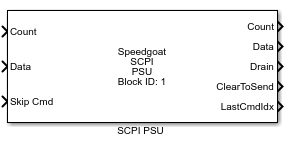
Ports
The number of input elements depends on the number of commands configured in the
block mask Command Table.
Inputs
-
Count
Number of bytes received from the serial interface.
Data Type:
uint32
-
Data
Data received from the serial interface.
Data Type:
uint8
-
Skip Cmd
This port is used to skip a command when it is stuck for any reason,
and to activate it the input must switch from 0 to 1. Please refer to
the usage notes for
additional information.
Data Type:
uint8
-
Retry Cmd
This port is used to resend a command when it is stuck for any reason,
and to activate it the input must switch from 0 to 1. Please refer to
the usage notes for
additional information.
Data Type:
uint8
-
<n>#S<adr>[<cmd>][Ch<ch>]
For each command line correctly configured as Set in the Command
Table in the mask, a port is created indicating the line
number in the command table (<n>), an indication that this is a Set
command (S), the address of the destination device (<adr>) if the
device uses it, the selected command abbreviation (<cmd>), and the
channel (<ch>) if the device uses it. For example, if the first
command is a Set Voltage command for device 9 and channel 2 is selected,
the name of the port could be "1#S9[Volt][Ch2]". Showing the command
abbreviation, channel number or address number, can be enabled or
disabled in the mask options.
The command is sent every time the input value changes (the input
value is the command parameter). The port internal value is initialized
at -1. If during the first execution a
specific command does not need to be sent, set the value for the command
to -1.
Data Type:
double
-
<n>#R<adr>[<cmd>][Ch<ch>]
For each command line correctly configured as Request in the Command
Table in the mask, a port is created indicating the line
number in the command table (<n>), an indication that this is a
Request command (R), the address of the destination device (<adr>) if
the device uses it, the selected command abbreviation (<cmd>), and
the channel (<ch>) if the device uses it. For example, if the first
command is a Request Voltage command for device 9 and channel 2 is
selected, the name of the port could be "1#R9[Volt][Ch2]". Showing the
command abbreviation, channel number or address number, can be enabled
or disabled in the mask options.
The command is sent every time the input value changes. The port
internal value is initialized at -1. If
during the first execution a specific command does not need to be sent,
set the value for the command to -1.
Data Type:
double
Outputs
-
Count
Number of bytes to send to the serial interface.
Data Type:
uint32
-
Data
Data to send to the serial interface.
Data Type:
uint8
-
Drain
This port outputs all the unexpected messages and errors received from
the device. When a Drain message is received, this is also displayed on
the status monitor of the target machine, with additional information
depending on the case; for example, if the received response was not the
expected one, it will show the received and the expected. Usually when a
message is sent to Drain, the communication is also stuck and
ClearToSend is not enabled. Refer to the usage notes for
additional information.
Data Type:
uint8
-
ClearToSend
This port outputs the internal state of the ClearToSend flag. When the
port is true, the block is ready to send. When the port is false, the block
is waiting for a response, waiting for a timer, or stuck because an unexpected
message was received.
Data Type:
boolean
-
LastCmdIdx
This port outputs the number of the last command sent (first value of
the command port name)
Data Type:
int8
-
<n>#R<adr>[<cmd>][Ch<ch>]
For each command line correctly configured as Request in the Command
Table in the mask, an input port is created as explained
above, and a corresponding output port is created to display the
response from the device.
Data Type:
double
Main Tab parameters
Device Settings
-
ID
Defines the block number. This value is not linked directly to any
physical device.
-
Device Type
Select the device from a list of preconfigured devices.
-
Communication Interface
Select the communication interface with which to communicate.
-
Transmit Software FIFO Size
This must match the TX FIFO communication interface, since it also
determines the Data output port size.
-
Receive Software FIFO Size
This must match the RX FIFO communication interface, since it also
determines the Data input port size.
-
Sample Time
Defines the base sample time at which this driver block gets its sample hit. This
parameter can also be set to -1 for inherited
sample time. The units are in seconds.
Commands
-
Save Command Table
This button saves and applies the changes in the Command Table, saving
internally the commands, and updating the input and output ports.
After this button is pushed, the Table
State will show that the table is up to date. The buttons
OK or Apply still need to be used, since Cancel will not keep the changes of the Command
Table.
-
Table State
Every time something changes with the configuration
(new/removed/moved/modified line, changed device), this field changes to
"Unsaved Table changes" . If the state is not "Command Table up to
date", it means that the configuration showed in the Command Table does
not represent the currently applied configuration.
-
Command Table
The table containing the commands to control the device. Please refer
to the usage
notes.
-
Add
Adds an empty command line in the Command
Table. If a command line is selected, it will create the
new one under it, if none are selected it will create it at the end of
the table.
-
Remove
Removes the selected lines of commands from the Command Table. At least one line must be
selected.
-
Up
Moves up the selected line by one in the Command
Table. One line must be selected.
-
Down
Moves down the selected line by one in the Command Table. One line must be selected.
Other
-
Suggested Message for the Serial Write Block ModelStop
There could be a suggested message to send at the end of model
execution, like a reset, for the specific device selected. This text can
be copied and then pasted in the ModelStop message field in the Serial
Write block for OnBoard Serial or IO50x/IO581 modules.
Options Tab parameters
Model Start Messages
This section of the block mask is used to define a series of messages sent at
the beginning of the execution. Note that these messages are sent during the
first model steps, not at model start.
-
Enable
This enables the ModelStart message.
-
Messages
Messages are declared here. Multiple messages can be sent, but they
must be separated using this format: {[msg1], [msg2], ...}. Each message
can be an array of char, a string, an array of numerical values, or a
combination of these. Char arrays and strings are automatically
converted to their numerical ASCII equivalents. The SCPI PSU block will
not add the termination to the message, so you must add it yourself
(e.g., carriage return, line feed, NULL).
-
Delay Between Each Message [ms]
This is the delay applied after each one of the ModelStart messages
declared.
Port Text Options
-
Show Command on the port
Shows the command name in the port label.
-
Show Address on the port
Shows the device address in the port label. This option is disabled
when daisy chaining is not available for the selected device.
-
Show Channel on the port
Shows the device channel in the port label. This option is disabled
when the selected device has only one channel.
Port Options
-
Show Skip Cmd Port
Enables and shows the Skip Cmd Port.
-
Show Retry Cmd Port
Enables and shows the Retry Cmd Port.