IO751 - Record Write
IO751 - Record Write — Writes records of remote
PROFINET devices.
Library
Simulink Real-Time - Speedgoat
Description
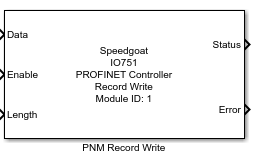
This block is used to write records of remote PROFINET devices. Use one block for
each record you want to write.
Reading and writing of records is performed acyclically. Device response times
vary. Record read and write commands are executed one after another. The more Record
blocks you place in your model the longer you will wait for responses from connected
devices.
Ports
Inputs
-
Data
The value that should be written to the record in the remote device.
The port inherits the data type and the dimensions from the connected
source block. The data type and dimensions do not both need to match the
data type and dimensions of the record in the remote slave device, but
the overall number of bytes must be equal to or less than the size of
the record.
Data type: Fundamental data types
from boolean to double are supported as well as dimensions from scalar
values to vectors
-
Enable
The block sends out write requests as long as the input port is
TRUE.
Best practice is to set the block's sample time to a higher rate (like
1 ms) and trigger the Enable input port
at a lower rate. This ensures low network traffic but immediate updates
of the output ports once a response is received.
Data type: boolean
-
Length
The actual size of the data that should be written to the record,
specified in number of bytes.
If enabled by the Extended Interface
parameter, the port limits the size of the data to be written to the
record. The write request will contain a subset of the signal connected
with the Data input port.
If disabled, the entire signal connected with the Data input port will be written to the
record.
Data type: uint32
Outputs
-
Status
A rising or falling edge indicates a completed write operation. Either
a response was received and Data was written or the Error output port provides an error
code.
If the Status output does not change,
the write operation is still in progress or the block is idle.
Data type: uint32
-
Error
Outputs the error code reported by the driver, the protocol stack or
the remote device (the error included in the response).
Data type: uint32
Parameters
-
Module ID
This ID defines the link to the corresponding Setup block
-
Device Index
The index of the remote PROFINET device. Find the index in the
SYCON.net project. In SYCON.net, double-click the controller node. In
the navigation area, click Device
Table. In the table on the right, navigate to the device
whose record you want to read and locate the device index in the
Index column.
-
API
The API of the module to which the record belongs. Valid values are
between 0 and 0xFFFFFFF.
-
Slot
The slot of the module to which the record belongs. Valid values are
between 0 and 0xFFFF.
-
Sub-Slot
The subslot of the submodule to which the record belongs. Valid values
are between 0 and 0xFFFF.
-
Index
Enter the index of the record within the respective subslot.
Corresponds to the XML attribute Index of the related
ParameterRecordDataItem in the GSDML file. Valid values are between 0
and 0xFFFF
-
Timeout
The time the module should wait for a response from the remote device
before allowing the next Record block to send out its request.
-
Extended Interface
If selected, the block shows the Length input port, the Status output port and the Error output port. Otherwise, the ports are hidden.
-
Sample Time
Defines the base sample time at which this driver block gets its sample hit. This
parameter can also be set to -1 for inherited
sample time. The units are in seconds.
![[Caution]](images/caution.png) | Caution |
|---|
All blocks that interface with the same I/O module must have identical
sample times. |