IO642 - Setup
IO642 - Setup — Configure the IO642 IO
module
Library
Simulink Real-Time - Speedgoat
Description
Your model can contain only one Setup block
for each I/O module in your target machine.
Ports
This driver block has no input or output ports.
Parameters
Tab: Configuration
- Module ID
The Module ID has two functions:
It logically connects the Setup block and its I/O blocks
It also informs the auto-search feature of the PCI Slot parameter. If only
one I/O module of this family is installed, the Module ID must be set to
1. To see how each I/O module maps to a
Module ID, use this Speedgoat API:
speedgoat.getIoInterfaces("TargetName", "mySpeedgoat")
This Setup block belongs to two families of I/O modules that use the same hardware
for multiple protocols. Across both families, the Module ID must be unique.
IO64X/IO75X (single-node modules): IO641,
IO642, IO643, IO644, IO750, IO751, IO752, IO753, IO754, IO755, IO756,
IO758
IO64X-32/IO75X-32 (multi-node modules):
IO642-32, IO752-32, IO754-32, IO756-32
If the PCI Slot parameter is set to -1
(auto-search), the Module ID must be in the range 1:n, where 'n' cannot be larger
than the number of modules of this type installed in the target machine. Not all
installed I/O modules need to be used.
To use this Setup block with a multi-node I/O module (IO75X-32 family), the Module
ID must be defined as a two-element vector. The second vector element is the
sub-module ID. It describes the specific node (1:32) within the I/O module. The 32
nodes are internally connected to form two linear networks (daisy-chain), where the
first and the last node of both chains are externally accessible. If one node is not
configured (has no Setup block), the chain terminates at this point. The sub-module
IDs must therefore start at node 1, 16, 17 or 32 and not have any gaps.
![[Note]](images/note.png) | Note |
|---|
When using I/O modules of both families simultaneously (single-node and
multi-node I/O modules), always use explicit addressing in the PCI Slot parameter. Ignore the Module IDs returned by
the getIoInterfaces function and instead assign unique Module IDs accross all
modules used. |
-
Configuration Mode
Select Configuration file to use the
configuration files generated with SYCON.net. Use Warmstart to configure the I/O module by the block mask parameters
completely.
-
Target Machine Drive Letter
The drive letter of your target machine where the firmware and configuration files
will be stored. The default drive is "C:\".
| Note |
|---|
This parameter serves no purpose in MATLAB R2020b and later. |
-
Sample Time
Defines the base sample time at which this driver block gets its sample hit. This
parameter can also be set to -1 for inherited
sample time. The units are in seconds.
![[Caution]](images/caution.png) | Caution |
|---|
All blocks that interface with the same I/O module must have identical
sample times. |
-
PCI Slot (-1: auto-search)
There are two approaches for mapping the block to a specific I/O
module installed in your target machine. All modules of the same
family (see Module ID above) must be configured using the same
method.
- Auto-Search: with the default value -1 the I/O module will be
automatically located in the target machine. If you have
multiple modules of the same family, the Module ID (first
vector element for a multi-node module) defines which module
is associated with this block. To see how each I/O module
maps to a Module ID, use this Speedgoat API:
speedgoat.getIoInterfaces("TargetName", "mySpeedgoat") - Explicit Addressing: to explicitly define the logical
address of the I/O module in the target machine, you can
provide the PCI bus and slot numbers as a vector: [bus,
slot]. To determine these numbers, run the following command
in the MATLAB command window:
speedgoat.getIoInterfaces("TargetName", "mySpeedgoat", "Advanced", true)Note
that the PCI address can change whenever an I/O module is
added or removed. Usually, auto-search is the best option.
Tab: Warmstart
-
Ident Number
0x0000…0xFFFF
The identification number of the slave that is reported to the
DPMaster. This number is unique for each slave device as it is uniquely
assigned by the Profibus Trade Organization. When the default value
0x0000 applies, the card firmware uses ident number 0xB756 (CIFX DP/DPS
Hilscher GmbH).
If you emulate a certain device use the value of property Ident_Number
of the related GSD file.
-
Ignore bus address change from master
If set, the slave stack does not support the "Set Slave Address"
command.
-
Bus Address
Network station address: 2…126
-
Baud Rate
Available values: 9.6 kBit/s-1.5 Mbit/s and auto-detect.
-
Auto configuration
If set, you do not need to set the module configuration of the slave.
The stack takes over the module configuration from the Chk_Cfg telegram
received from the master.
-
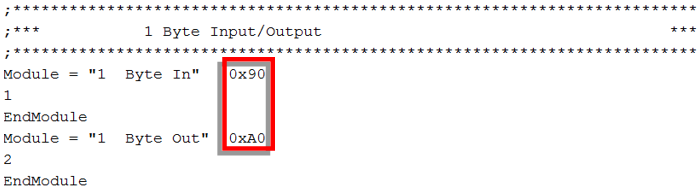
I/O data configuration bytes
See examples below.
-
Enable DPV1 support
If set, DPV1 functions are activated.
If you emulate a certain device please look at the property DPV1_Slave
in the related GSD file. Enable DPV1 support in case the property value
is 1.
-
Enable SYNC support
If set, the slave stack supports the SYNC command and the SYNC mode is
activated.
If you emulate a certain device please look at the property
Sync_Mode_supp in the related GSD file. Enable SYNC support in case the
property value is 1.
-
Enable FREEZE support
If set, the slave stack supports the FREEZE command and the FREEZE
mode is activated.
If you emulate a certain device please look at the property
Freeze_Mode_supp in the related GSD file. Enable FREEZE support in case
the property value is 1.
-
Enable FAILSAFE support
Set to activate FAILSAFE mode.
If you emulate a certain device please look at the property Fail_Safe
in the related GSD file. Enable FAILSAFE support in case the property
value is 1.
-
Disable ALARM SAP 50 support
If set, the slave stack expects alarm acknowledges from the master at
service access point 51.
If not set, the slave stack expects alarm acknowledges from the master
at service access point 50.
If you emulate a certain device please look at the property
Extra_Alarm_SAP_supp in the related GSD file. Disable ALARM SAP support
in case the property value is 0 or the GSD file does not contain the
property.
Examples for "I/O data configuration bytes":
Hilscher: {'0x90', '0xA0'}
WAGO: {'0x20', '0x01', '0x00'}
