DMA Controller v1
DMA Controller v1 — The DMA Controller shows
detailed information about rate timing in case the model is set up with the
Optimize Data Transfer switched on.
Library
Simulink Real-Time - Speedgoat
Description
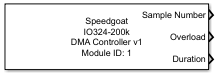
If the model is set up with an IO3xx module and Optimize Data Transfer is used,
you can add this block to the model to get detailed information about duration of
the fastest rate in your model.
Ports
Outputs
-
Sample Number
This output indicates the corresponding sample step. It is a counter
that overflows at 127
-
Overload
This output indicates if the last sample step has been overloaded over
time
-
Duration
This output indicates the total amount of time in seconds that was
needed for the last sample step. This includes data transfer to and from
the FPGA and the TET for the model step
![[Note]](images/note.png) | Note |
|---|
These ports are only visible if the parameter Show
Status Info is set |
Parameters
Tab: Module setup
-
Configurable I/O Module ID
This parameter associates a code module block with a configurable I/O module setup
block. Set this value to match the Module ID defined in the setup block of the
required configurable I/O module.