Digital - Output v1
Digital - Output v1 — Writes the digital outputs of
the configurable I/O module
Library
Simulink Real-Time - Speedgoat
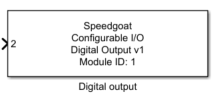
Description
A Simulink model can contain only one digital output block for each physical IO3xx
card in your system.
Ports
This driver block has one input and no output ports. According to your input type
configuration, the input can be one of the following:
-
32 ports of type double
32 input ports of type double are shown. Each port is a scalar either
having value 0.0 (Low) or 1.0 (High).
-
1 port with 32 element vector of type double
One input port of type double is shown. The port has a width of 32
where each element returns either 0.0 (Low) or 1.0 (High) for the
corresponding channel.
Parameters
Tab: Module setup
-
Configurable I/O Module ID
This parameter associates a code module block with a configurable I/O module setup
block. Set this value to match the Module ID defined in the setup block of the
required configurable I/O module.
-
Channel Vector
A vector of channels this driver block entity will access. You can specify
channels in the range 1-N (N = the number of channels implemented in your specific
configuration file defined in the Setup block). The width of this vector also
defines the subsequent size of some of the following parameters if scalar expansion
applies. With a single block, all the channels of the block are synchronized.
-
Init values vector
A vector of values to define the initial signal level present on the
output ports after the real-time application has been downloaded and
started.
-
Reset vector
A vector of values to define the output ports when the real-time
application stops. When set to (0), the output port retains the last
value defined in the application. When set to (1), the output port is
set to the value applied in the Init values
vector parameter.
-
Sample Time
Defines the base sample time at which this driver block gets its sample hit. This
parameter can also be set to -1 for inherited
sample time. The units are in seconds.
Tab: Input and output port configuration
-
Vectorize input port
Set the input port of the driver block to be a vector.