Modbus - Server Fault Insertion
Modbus - Server Fault Insertion — Blocks connections attempts and
modifies Modbus messages
Library
Simulink Real-Time - Speedgoat
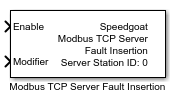
Description
This block rejects connection attempts from certain clients and modifies Modbus
messages before they are sent to the client. You can place multiple Fault Insertion
blocks in the model.
Ports
Inputs
-
Enable
If enabled by the Show Enable port
parameter, this port enables or disables the items defined in the
Rules table. The signal connected
to the port must be a boolean array whose length matches the number of
defined rules. Each array element corresponds to a rule, following the
order in the table; if no rule is defined, the port is hidden. A value
of TRUE enables the corresponding rule, while a value of FALSE disables
it.
-
Modifier
If enabled by the Show Modifier port
parameter, this port sets the modifiers for the rules in message mode.
The Modifier column in the Rules table no longer serves a purpose. The
signal connected to the port must be a double array whose length matches
the number of defined rules. Each array element corresponds to a rule,
following the order in the table; if no rule is defined or the Mode parameter is not set to Message, the port is hidden.
Outputs
This block does not have any output ports.
Parameters
-
Server Station ID
Apply the Server Station ID of the
corresponding Setup block. It must range between 0 and 65535.
-
Sample Time
Defines the base sample time at which this driver block gets its sample hit. This
parameter can also be set to -1 for inherited
sample time. The units are in seconds.
-
Mode
Specifies the basic operation of the block. In Peer mode, the block accepts or rejects connection
attempts from specific remote clients. In Message mode, the block modifies the content of the
message that will be sent to the client. In general, Modbus servers only
send messages in response to client requests.
-
Rules
The table contains the action items for the Peer and Message modes.
During runtime, the rules are processed sequentially from top to bottom.
If the effects of multiple rules overlap, the last rule takes
precedence. If rules are distributed across multiple Fault Insertion
blocks, the execution order of those blocks also influences which rule
takes precedence. Depending on the Mode
parameter, the table displays different columns:
Peer mode
The Action column
defines how to handle incoming connection requests from
clients. By default, if no rules are defined, all
connection attempts from any client are accepted.
The IP Address
column defines the remote IP addresses to which the rule
applies. Values can be scalars or two-element vectors,
where the first element specifies the start of the range
and the second element specifies the end of the range.
Supported formats include character arrays such as
'192.168.1.101', strings such as "192.168.1.101", string
vectors such as ["192.168.1.101","192.168.1.105"],
numeric scalars such as hex2dec('C0A80165'), numeric
vectors such as [hex2dec('C0A80165'),
hex2dec('C0A80169')], and cell arrays containing numeric
values, strings, or character arrays such as
{'192.168.1.101','192.168.1.105'}.
If the value is -1,
the rule is applied to all IP addresses.
The TCP Port column
defines the remote TCP ports to which the rule is
applied. Values must be numeric and can be scalars or
two-element vectors, where the first element specifies
the start of the range and the second element specifies
the end of the range. Example of a single port: 502.
Example of a port range: [500, 599].
If the value is -1,
the rule is applied to all ports.
Message mode
The Action column
defines how to manipulate the response message that is
sent to the client. The action is processed only if the
request message previously received from the client
matches the filter criteria defined by the Unit, Function Code, and Index columns.
The Unit column
defines a filter for the unit value in the request
message received from the client. The rule is applied
only if the received unit value falls within the
specified range. Values can be numeric scalars or
two-element vectors, where the first element specifies
the start of the range and the second element specifies
the end of the range. Valid values range from 0 to 255.
If the value is -1,
the unit value in the received message is ignored.
The Function Code
column defines a filter for the function code value in
the request message received from the client. The rule
is applied only if the received function code falls
within the specified range. Values can be numeric
scalars or two-element vectors, where the first element
specifies the start of the range and the second element
specifies the end of the range. Valid values range from
0 to 255.
If the value is -1,
the function code value in the received message is
ignored.
The Index column
defines a filter for the index and quantity values in
the request message received from the client. The rule
is applied only if the requested data range overlaps
with the specified range. Values can be numeric scalars
or two-element vectors, where the first element
specifies the start of the range and the second element
specifies the end of the range. Valid values range from
0 to 65535.
If the value is -1,
the index and quantity values in the received message
are ignored.
Depending on the selected action, the Modifier is either written
directly to the corresponding field in the response
message or added to the intended value of that
field.
-
Show Enable port
If selected, the block shows the Enable input port; otherwise, the port is hidden.
-
Show Modifier port
If selected, the block shows the Modifier input port; otherwise, the port is
hidden.